When you need help · Chapter 20
Help: Searching the guide and asking Digital Nancy
The Help panel at the top of every page: Finding the section of this guide you need as you type, and asking Digital Nancy how to do something or why it is done the way it is.
In this chapter you will
- open Help from any page, and find the chapter for the page you are on
- find the section of the guide you need as you type
- ask Digital Nancy how to do something, or why HiMatcher does it the way it does
- know what she can answer, and what she cannot see
- tell the people who run HiMatcher when her answer did not help
You should never have to read a whole chapter to find one thing. Help, at the top of every page, finds the part of this guide you need, and where the guide is not enough, Digital Nancy answers the question itself.
Help on every page
Click Help at the top of any page, or press the / key anywhere you are not typing, and the panel opens on the right. The page stays as it was underneath: Read the answer and carry on working beside it. Esc, or the cross at the top of the panel, closes it.
At the top of the panel, before you type, How this page works opens the chapter that explains the page you are on, in a new tab, at the right section. The whole User's Guide opens the cover. Move to another page and the panel stays as you left it, with what you typed and what Digital Nancy said.
Searching the guide
Type a few words. The sections of this guide that match appear under the box as you type, best first, each with its chapter and the words around what was found. Click one and the guide opens at that section itself, marked for a moment so the eye finds it.
You need not know the words this guide uses. Type "spec" and you find the person specification; type "JD" and you find the job description; "scoring" finds "scored" and "score". The last word is looked for as you type it, so "interv" already finds the interviews. If nothing matches, the panel says so, and Digital Nancy may find it put another way.
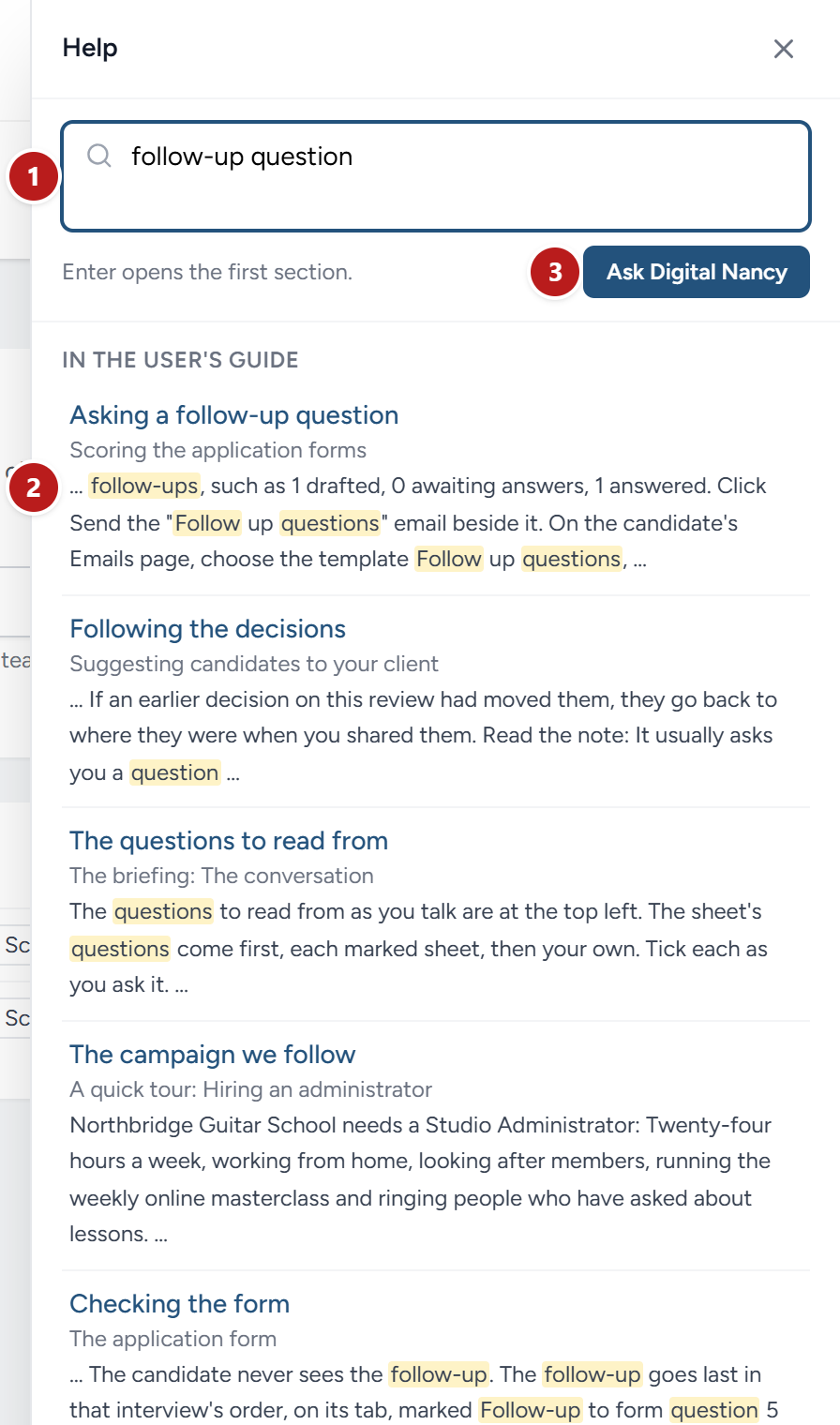
- The box. Type a few words to search, or a whole question to ask.
- A section found, with its chapter and the words around what was found. Click it to open the guide there.
- Ask Digital Nancy puts the same words to her as a question.
The guide's own pages have the same search, in the bar at the top of every chapter.
Asking Digital Nancy
Type a whole question and click Ask Digital Nancy, or press Enter. Enter asks once what you typed reads as a question: It ends with a question mark, or has four words or more. Shorter than that, Enter opens the first section found.
She answers there in the panel, usually in a few seconds. Two kinds of question suit her:
- How do I…? "How do I add the criteria to a question I added to the short interview?" She answers from this guide, naming the buttons and tabs as it names them, and lists under Read more in the guide the sections her answer rests on, each a link to the section itself.
- Why…? "Why does the short interview always start with the same question?" She answers from Nancy's method, the rules every draft and every scoring level is made to, and says so under the answer. Nancy's method is her own work, so Digital Nancy gives you its reasons in her own words rather than reading it out.
Ask the next question straight after, and she reads it in the light of the last: "And where do I find that?" follows on. Start a new conversation clears the panel when you change subject. She knows which page you asked from, so "on this page" means what you would expect.
Every question you ask is yours alone: Nobody else in your organisation sees it.
What she can and cannot answer
She cannot see your campaigns, your candidates, their answers or your messages: Nothing of them is sent to her with your question. So ask how something works rather than about one person. Asked "Why is this candidate at Met some?", she says she cannot see them from here, and where on HiMatcher you would look.
She does not invent screens or steps. Where this guide does not say how to do something, she says so plainly rather than guessing.
Each answer is a call to Digital Nancy, and counts with the rest of her work outside any campaign. See Digital Nancy and your own key. If she cannot work for your organisation just now, the panel says why, with Ask again.
When the answer does not help
Under every answer, That did not answer it sends your question and her answer to the people who run HiMatcher, with a line on what you wanted to know if you write one. It is how this guide learns what it does not yet say.
This chapter was last revised on 3 November 2026.