Running a campaign · Chapter 5
The briefing: The conversation
Recording the hiring manager with the questions in front of you, having the recording written out or uploading the transcript, adding what was agreed but not said, and adding a later meeting.
In this chapter you will
- offer the client a few times for the conversation, and have them book one
- read from the sheet's questions and your own as you talk, and tick them off
- use the call view on a phone or a second screen: A note under each question, kept, and more questions from Digital Nancy as you go
- record the conversation, or upload a recording, and have it written out; or upload a transcript you already have
- check the transcript, and add notes Digital Nancy should read as well
- add a later meeting with the client from the briefing, when it was about this role alone
Before you start
The conversation is where the client's written answers become something you can assess. You have two things ready from the chapter before: The briefing sheet, with a question to put to the manager about every line they wrote, and your own questions. Both are on the Interview part of the briefing, which holds everything the conversation needs and nothing else: The questions on the left, the recorder and your notes on the right.
Booking the conversation
You do not need to go back and forth by email to find a time. At the top of the Hiring manager meeting part, under When the conversation is, type a day and a time, Add another time for each further one, say how many minutes it takes and where or how you will talk, and click Offer these times. Everyone at the client you asked to answer the briefing, and who has joined, is emailed the times and picks one on their own page. The times are shown in your organisation's zone, which is named beside the box.

A client can book only once their answers are in: The conversation builds on them, and the page tells them so. The moment someone books, you are emailed with a calendar file, they are sent one too, and the booking shows here with their name. Two more things happen at the same time. The briefing sheet is prepared from everything the client has sent by then, so the questions for the conversation are ready without your asking, and the sheet says when it was prepared. Anything the client sends after that is counted on the sheet as unread, and Prepare again reads it.
Remove beside a time takes it off the list. Cancel beside the booking cancels it and tells the person who booked, whose calendar file takes the event out; the other times stand, and they can pick another. A client can take their own booking back from their page, and you are told.
The questions to read from
The questions to read from as you talk are at the top left. The sheet's questions come first, each marked sheet, then your own. Tick each as you ask it. The ticks are for you, for the length of the conversation, and are not kept.
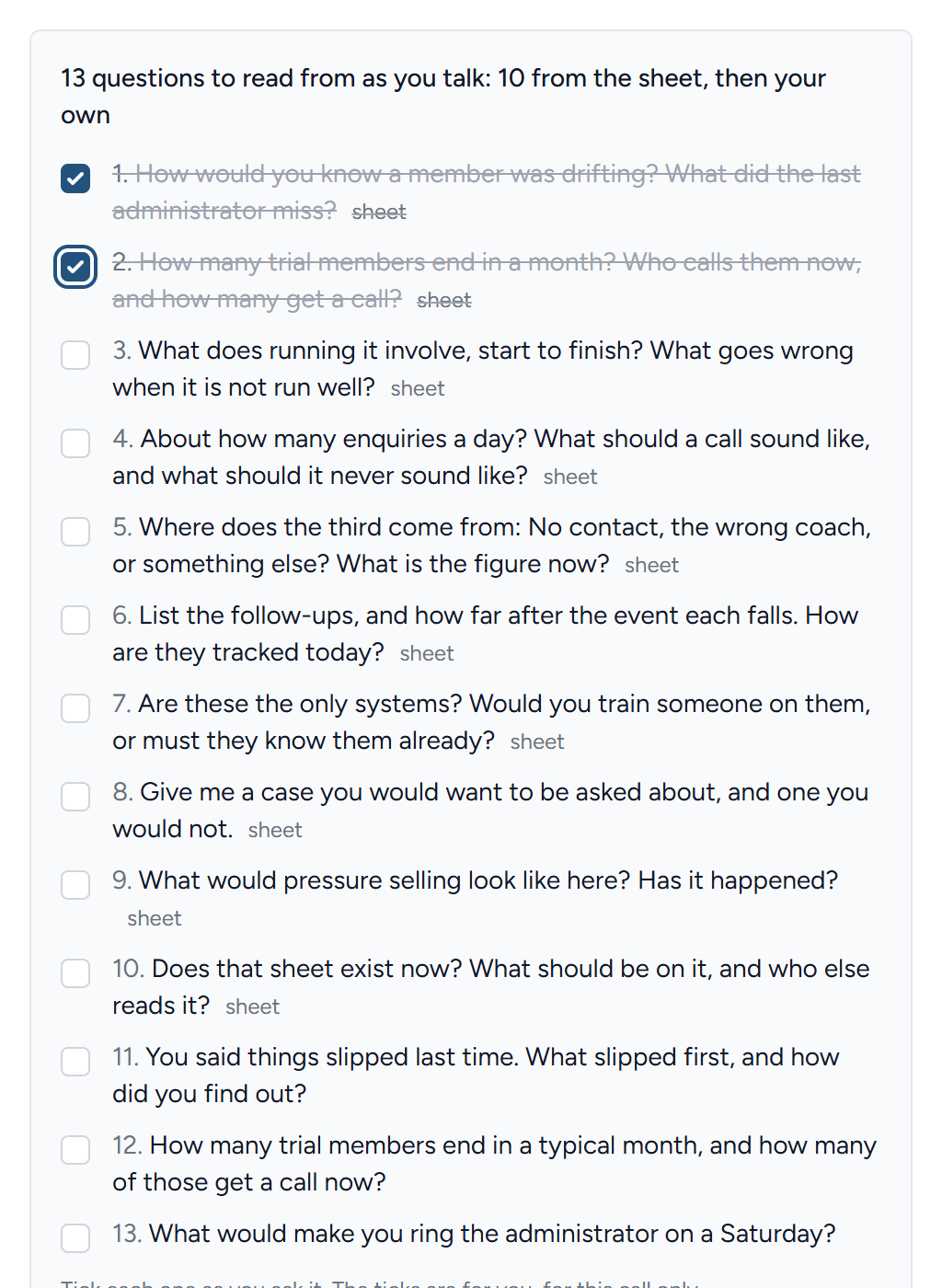
The sheet's questions ask for what makes a line assessable: A particular example, the number the client did not give, how the manager would know it done well or badly. The answers are what the specification's criteria and bands are written from, so ask them as written, and then ask the question that follows naturally: "What happened last time?", "Can you give me an example?", "What would you not put up with?".
The call view
The questions are also on a page of their own, made for a phone or a second screen while you talk: Click Open the call view under the questions. It has the same questions in the same order, each under the opening question it belongs to, with what the client wrote beside it so you can hear the difference between what they wrote and what they say. Tick each as you ask it, and type what they say in the box under it. Shorthand is fine: The recording has the words. Everything is saved as you type, kept with the briefing, and read by Digital Nancy with the transcript when the specification is drafted, so a number the manager gave in passing is not lost if the recording missed it.
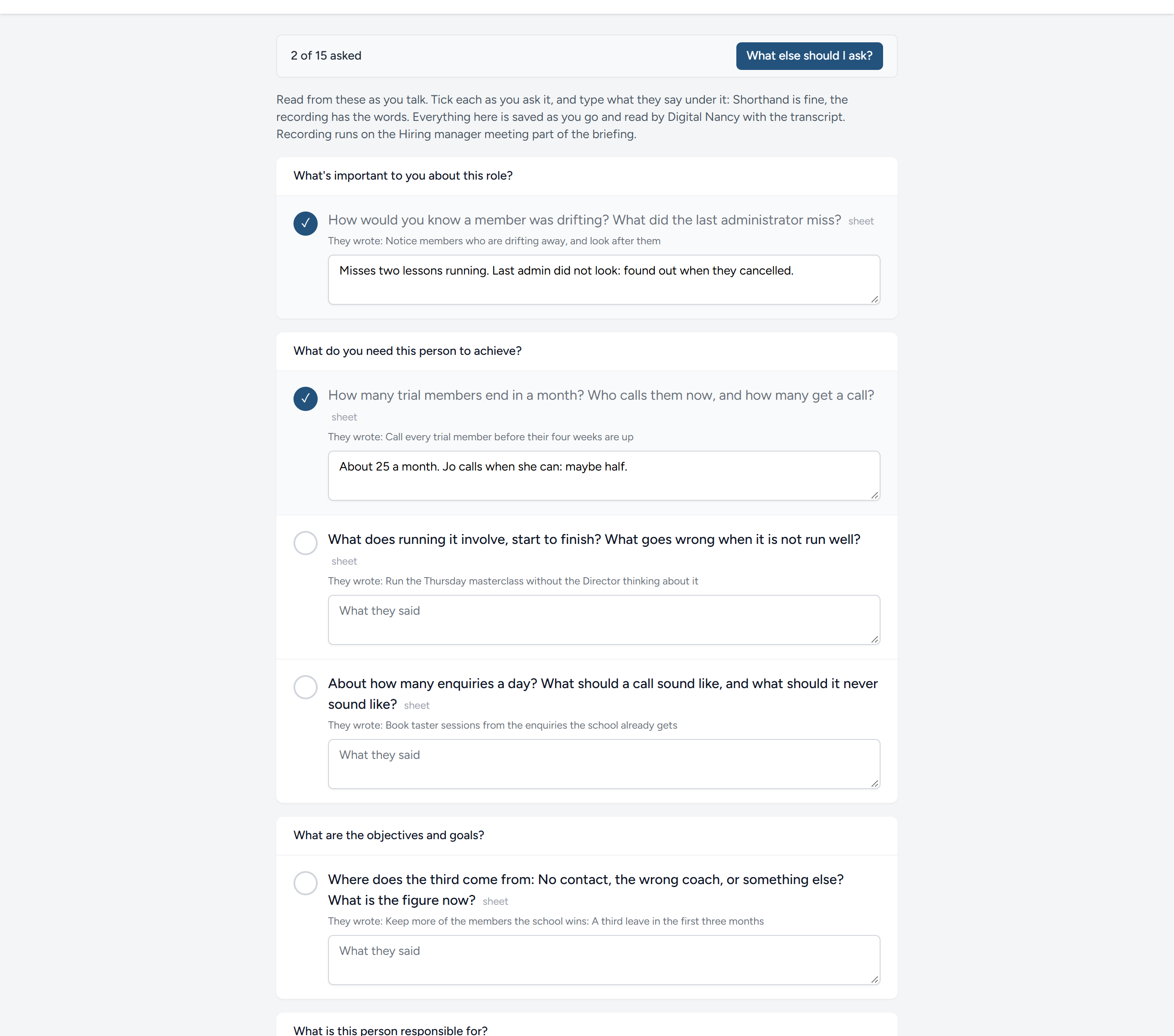
What else should I ask?, at the top, puts the client's answers, the sheet and your notes so far to Digital Nancy, and she suggests up to six questions to ask next, each with a line on why: The example behind a claim, the number that is still missing, which of two people's answers is right. They appear under Suggested on the call, with the others, and you tick and note them the same way. Ask as often as you like; she does not repeat a question already on the list.
Record the conversation
- If you are talking face to face or on a call you can hear through your speakers, click Start recording and carry on. Click Stop and save at the end. If the call was recorded somewhere else, upload the file instead, under Or upload a recording: An mp3, m4a, wav, webm or mp4.
- When you stop, HiMatcher sends the recording to your transcription service. A few minutes later the words are on the page, speaker by speaker. Click Show transcript under the recording to read them.
- If the conversation was written out somewhere else, by rev.com, say, or by the meeting tool it ran on, upload the transcript itself under Or upload a transcript: A plain text file or a Word document. It is read at once, with no transcription service needed, and sits under the recordings like any other, marked Transcript. Where each turn is headed with the speaker's name and the time, as rev.com writes it ("Jo (00:03:21):"), it is read speaker by speaker, with the names you gave; anything else is read as one block.
- Add anything that was agreed but not said aloud under Recruiter's notes. Digital Nancy reads the notes as well as the documents, the sheet and the transcript.
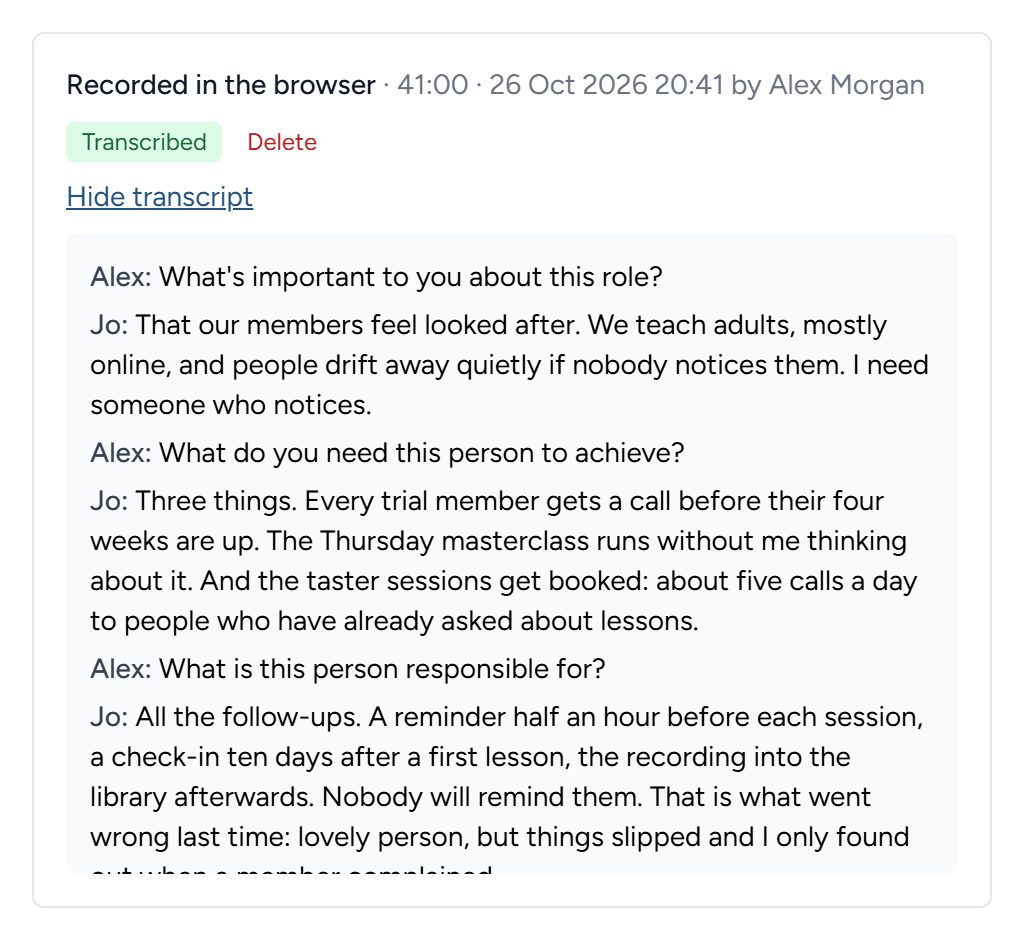
A recording that could not be transcribed is kept, and marked so, with a button to try again once a transcription service is set up. More than one recording is fine: A call that dropped and was restarted gives two, and both are read, oldest first. A recording and an uploaded transcript are read together in the same way.
A transcript or a recording that arrives after the person specification has been drafted does not change the draft, and the page says so under the recordings: The draft was made before this arrived. Ask for the draft again under Person specification, and it reads everything that is there. Once the specification has been created, a transcript cannot be read into it; what was agreed since goes in as a later meeting, which can be asked what it changes.
A later meeting, added from here
The client rings back about this role, or you meet them again. Where the meeting was about this role and no other, add it from the briefing rather than at the client's page: There is nothing to sort. Under the recorder's column, under After the interview, click Add a later meeting, or do the same from the Later meetings part once one exists.
- Say what it was and when.
- Add what you have of it: Your notes, documents, a transcript written out somewhere else. Any of the three, in any number, and click Add it to this briefing.
- A recording is added once the meeting is made. Under Later meetings, click Add a recording or a transcript of it beside the meeting, and record or upload as you would for the briefing. The transcript joins the meeting when it lands.
The meeting goes straight to this briefing's Later meetings, which appears in the list on the left as soon as there is one, and the whole of it is read by the next draft under its own heading, after the transcript. The client's page lists it under Meetings after the briefing with the rest, marked as added from its briefing, and more can be added to it on its own page at any time; whatever is added there reaches the briefing as well. What is already drafted does not change by itself: Ask for the draft again, or, once the specification exists, ask what the meeting changes in it. See After a later meeting.
What happens next
With the transcript in, Digital Nancy drafts the person specification unasked, and On to the person specification, at the foot of the part, takes you to it: See The person specification. The client's documents alone are enough to draft from if the conversation has not happened yet, and so is the conversation alone.
This chapter was last revised on 30 October 2026.