Understanding the method · Chapter 2
A quick tour: Hiring an administrator
One campaign from the first questions to the client to the offer, in twelve stops and about fifteen minutes.
In this chapter you will
- follow a real campaign from beginning to end
- see how the client is brought in, and what they write, say and agree before anything is advertised
- see everything Digital Nancy draws the person specification from, and who agrees it
- see the screen you will use at each stage after that
- find out which work HiMatcher does for you, what the client does, and which decisions stay yours
The campaign we follow
Northbridge Guitar School needs a Studio Administrator: Twenty-four hours a week, working from home, looking after members, running the weekly online masterclass and ringing people who have asked about lessons.
Alex Morgan, the studio manager, runs the campaign. Jo Fielding, the school's director, is the hiring manager: The person who will work with whoever is hired, and who will live with the result. In HiMatcher each vacancy is a campaign, and everything about it lives on one page.
Jo is also what HiMatcher calls the client: Whoever the job is for. A recruitment firm's campaigns belong to its clients; an organisation hiring for itself, as Northbridge does, puts them under its departments. Everything in this tour works the same way for both, so where it says "client", read "department" if that is you.
The order matters, and it is the method's. The client writes first. Then you talk. Then the person specification is drafted, and the client agrees it. Only then are the job description and the advertisement written, from the specification. Nothing is advertised until the client has agreed what the person must be able to do.
Stop 1: Starting the campaign, and asking the client in
Alex fills in the New campaign card: A working title the team will know it by, the title it is advertised under, the department, and under Who answers the briefing? the email addresses of the people who know the role. Alex types Jo's, and that of Pat Hughes, the office manager the new person will work beside.
The moment the campaign is made, each of them is emailed in Alex's name and asked to answer the opening questions on a page of their own. Someone who already signs in to HiMatcher is sent the link; someone new is invited, and the invitation takes them to the questions as soon as they have chosen a password. From then on they are client viewers: Guests, who see the parts of their campaigns that need them and nothing else.
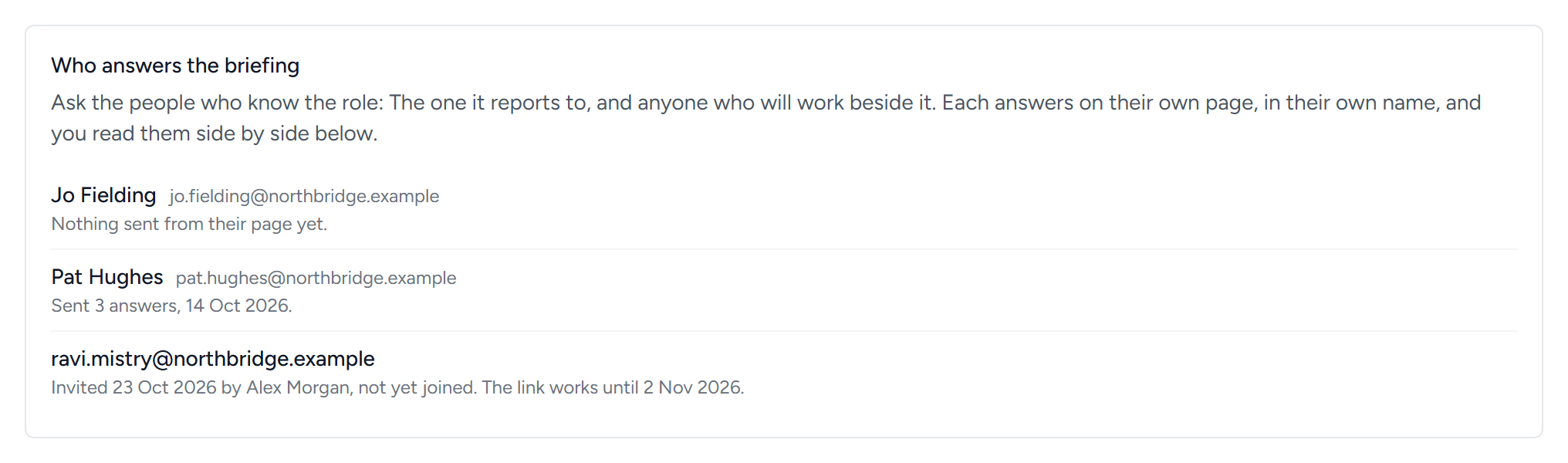
Alex can ask more people at any time, from the briefing, and remind anyone who has not answered. If the school's website has been read, Digital Nancy knows who is hiring from the first draft: What the school does, how it describes itself, and what a candidate would ask that the site does not say. The briefing has the detail.
Stop 2: The client answers in writing
Before anybody talks, the client writes. Jo and Pat each answer the method's nine opening questions, in their own name: "What do you need this person to achieve?", "How will you know this person was doing a good job in 3 and 6 months' time?", "What will be different if this person is successful?" They are about what the person must achieve, never a list of duties. The briefing gives all nine, and your organisation can change them.
Beneath the questions come a few plain facts the advertisement cannot be written without: Hours, pay, place, how the person is engaged, the systems they will use, the dealbreakers and the rest, with an organisation chart if there is one. Anything left open is asked again later, and never guessed.
They answer on the page, saving as they go, or send what they already have: A Word document, a spreadsheet, an email. Everything lands on the campaign's briefing under The client's answers, and the team is emailed. Where Jo and Pat answer a question differently, the briefing sets their answers side by side. Nobody smooths that over: A difference between the people who will work with this person is the best question you have.
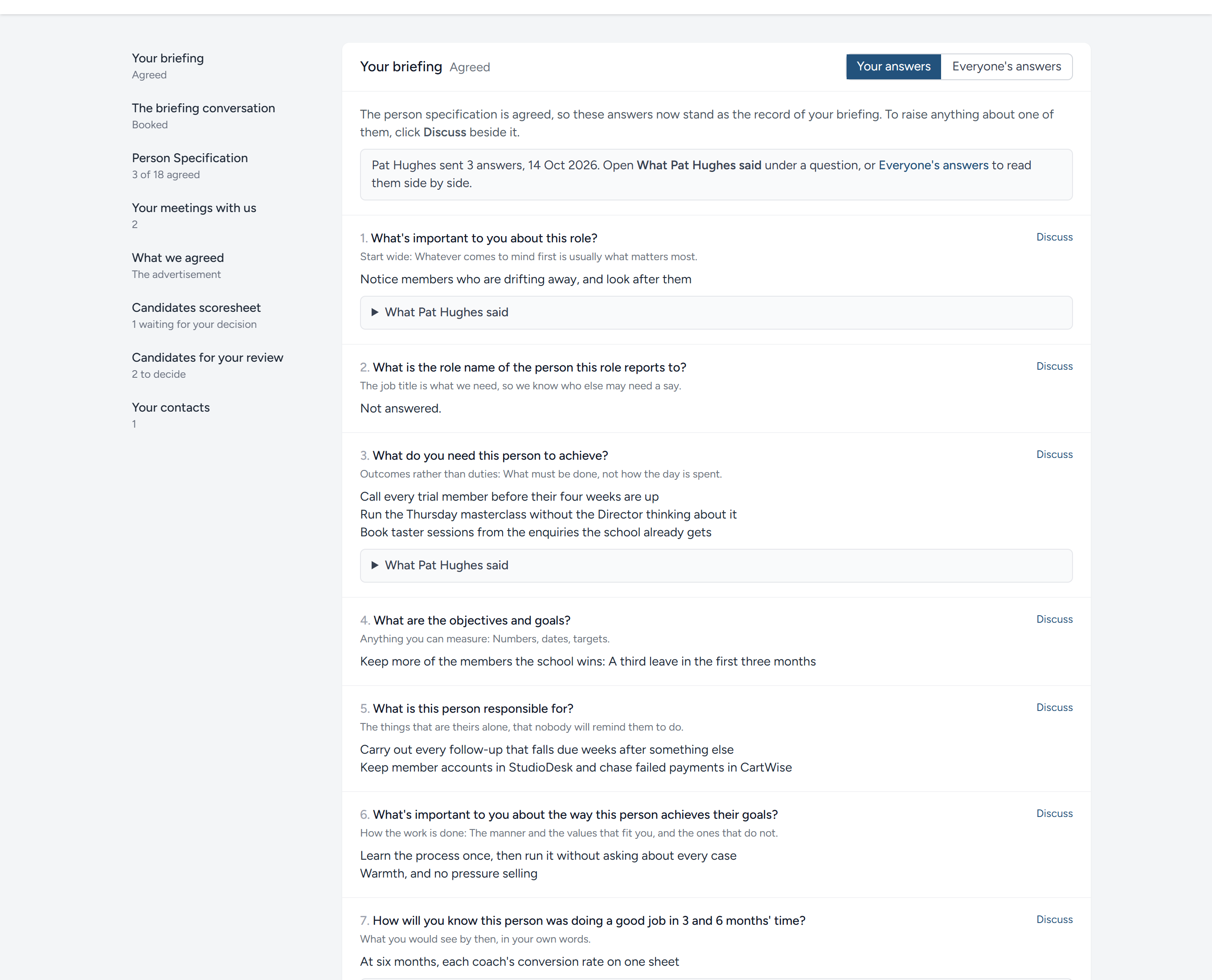
Discuss, beside every question, lets the client ask Alex's team about it without leaving the page.
Stop 3: The briefing sheet and the conversation
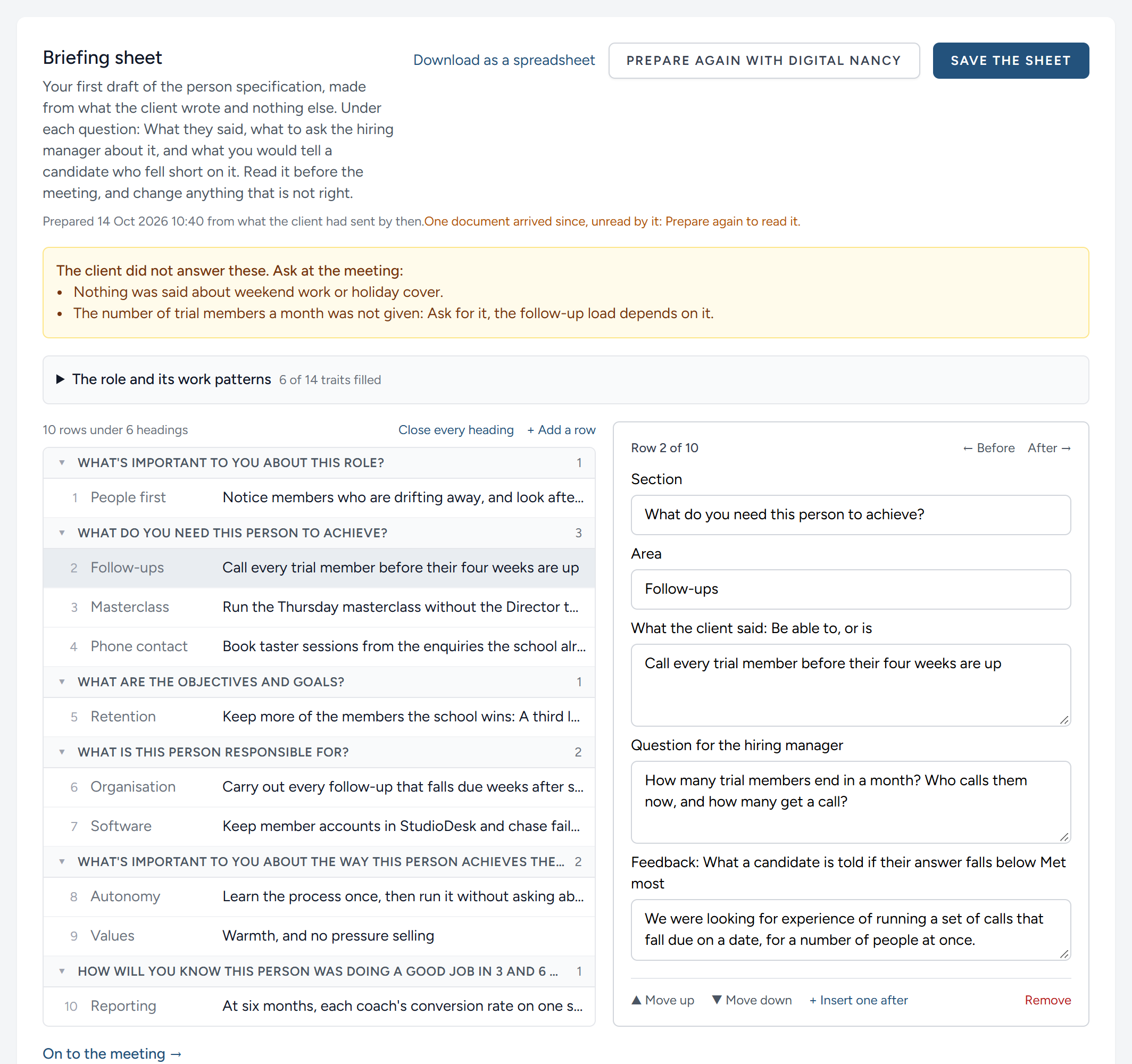
Alex offers three times for the conversation, and Jo books one from her page once her answers are in. Both of them are sent a calendar file. As she books, Digital Nancy prepares the briefing sheet from everything the client has written: The first draft of the person specification, in its own layout, one line for each thing the person must be able to do, and beside each line the question to ask the hiring manager that would make it something you can assess. A particular example, the number nobody gave, what lies behind a word like "proactive". Alex reads the sheet, corrects it, and writes down a few questions it does not have.
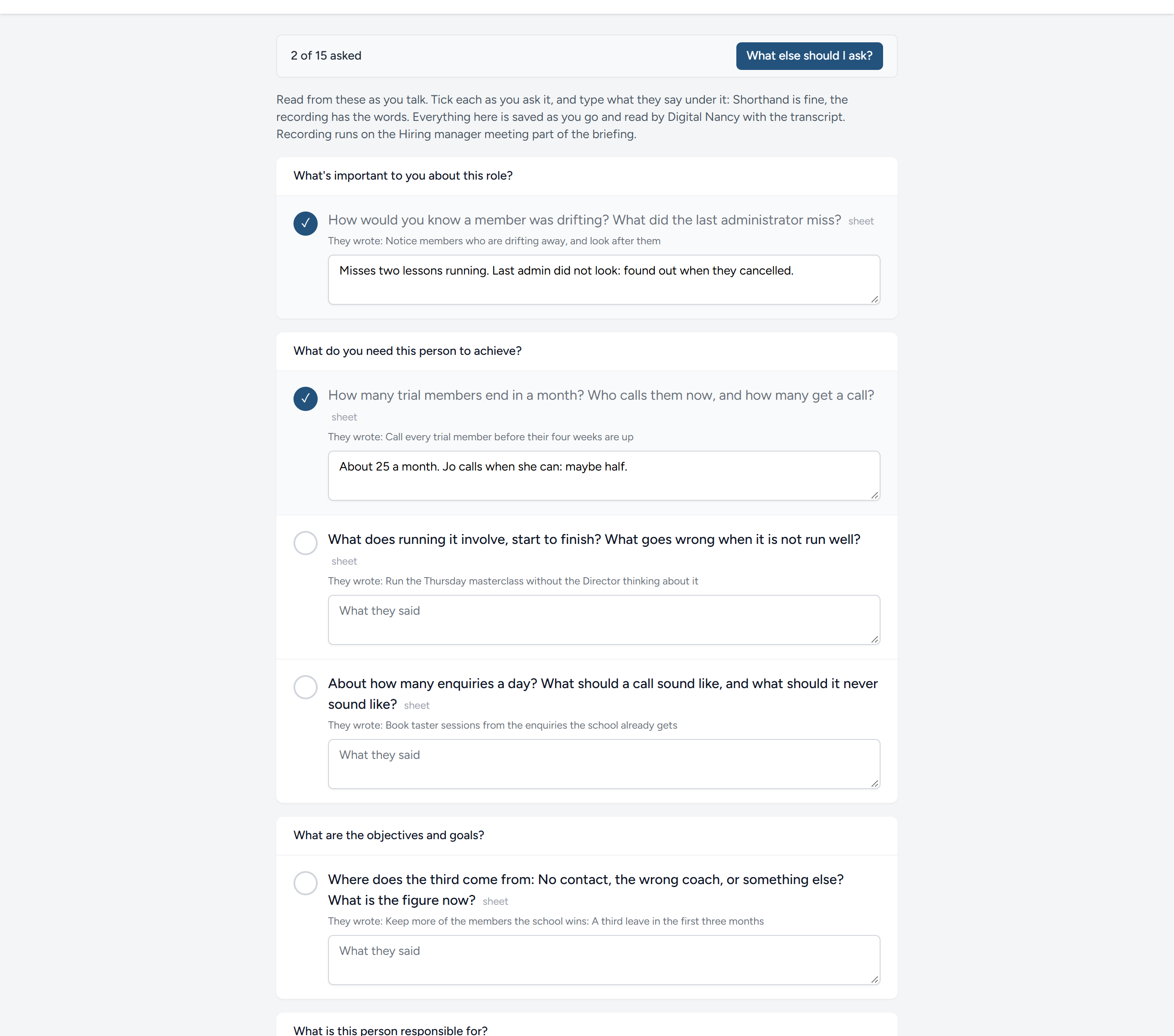
On the day, Alex talks to Jo for forty minutes, with the sheet's questions and Alex's own on the screen, and records the conversation straight into HiMatcher. A call recorded somewhere else can be uploaded instead, or a transcript of it. On a phone or a second screen, the call view has the same questions with what Jo wrote beside each and a box for a note under each, and What else should I ask? has Digital Nancy read the answers, the sheet and the notes so far and suggest what to ask next.
The recording is written out, speaker by speaker, a few minutes later. Anything agreed but not said aloud goes under Recruiter's notes. The briefing: The conversation covers all of it.
Stop 4: The person specification
As soon as the conversation is written out, Digital Nancy drafts the person specification unasked, under the method. She reads everything the briefing has gathered:
- What each person at the client wrote, and every document they sent
- The plain facts
- The briefing sheet, and the questions Alex added
- The transcript of the conversation, and the notes typed on the call view
- Alex's own notes
- Any later meeting (see the next stop)
- What the school's website says about it, where it has been read
Each criterion has the question that tests it, the criteria a good answer meets, the bands that say what Met all, Met most, Met some and Failed look like, and the line of feedback a candidate is sent who falls short on it. Wherever she had to guess, she says so, and those places are listed first, in amber.
Alex checks each criterion, settles the guesses, ticks the few requirements that are dealbreakers, and then shares the draft with the client. Jo and Pat read it row by row on their own pages, agree each row or comment on any part of it, and agree the whole when they are content. Their comments reach Alex's team under the row they are about. It is far cheaper to settle a row now than to find out at the final interview that the client meant something else.
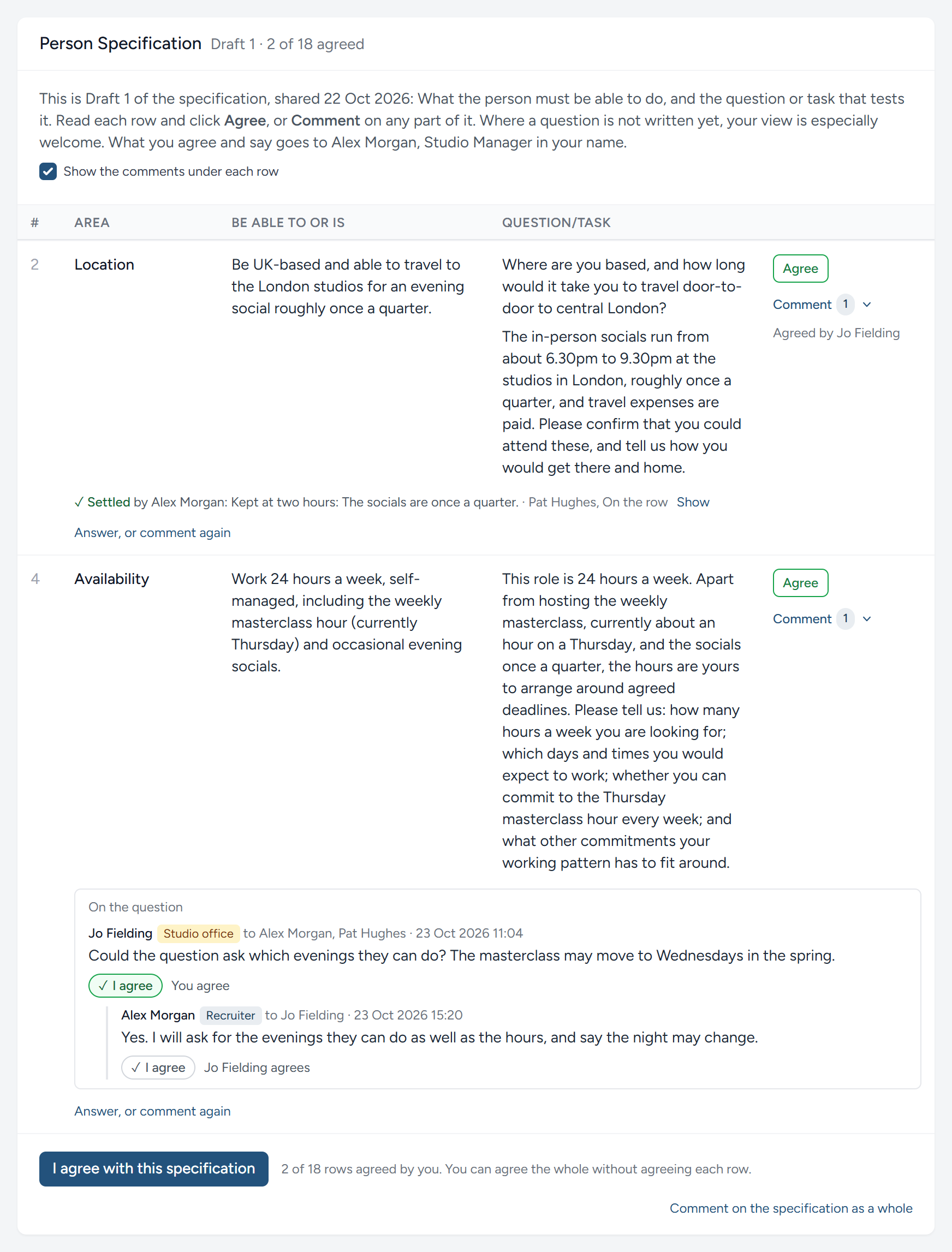
With the client's agreement, Alex creates version 1 and publishes it. Only then is it settled where each criterion is tested, and in what order: On the application form, at the short interview, as a task, at the long online interview, or by the client in person. Digital Nancy proposes the placing with a reason for each, and Alex moves whatever should go elsewhere. The person specification has the detail, and the spreadsheet in the method's own layout for anyone who would rather check it there.
Stop 5: Later meetings
A briefing is seldom the last word. Jo rings back about the hours, or the board meets and changes something.
A meeting about this role alone is added on the briefing, under Add a later meeting: Notes, documents, a transcript, or a recording made there and then. A meeting that covers more than one role is added once, on the client's page, and Digital Nancy sorts it into what concerns each campaign, quoting the passages each part rests on, for Alex to check before it goes in. Jo can read the meetings about her role on her own page.
While the specification is still a draft, the next draft simply reads the meeting with everything else. Once it exists, nothing changes by itself: Beside the meeting, What does it change in the specification? has Digital Nancy propose only what the meeting changes, each change with the passage it rests on, word for word.
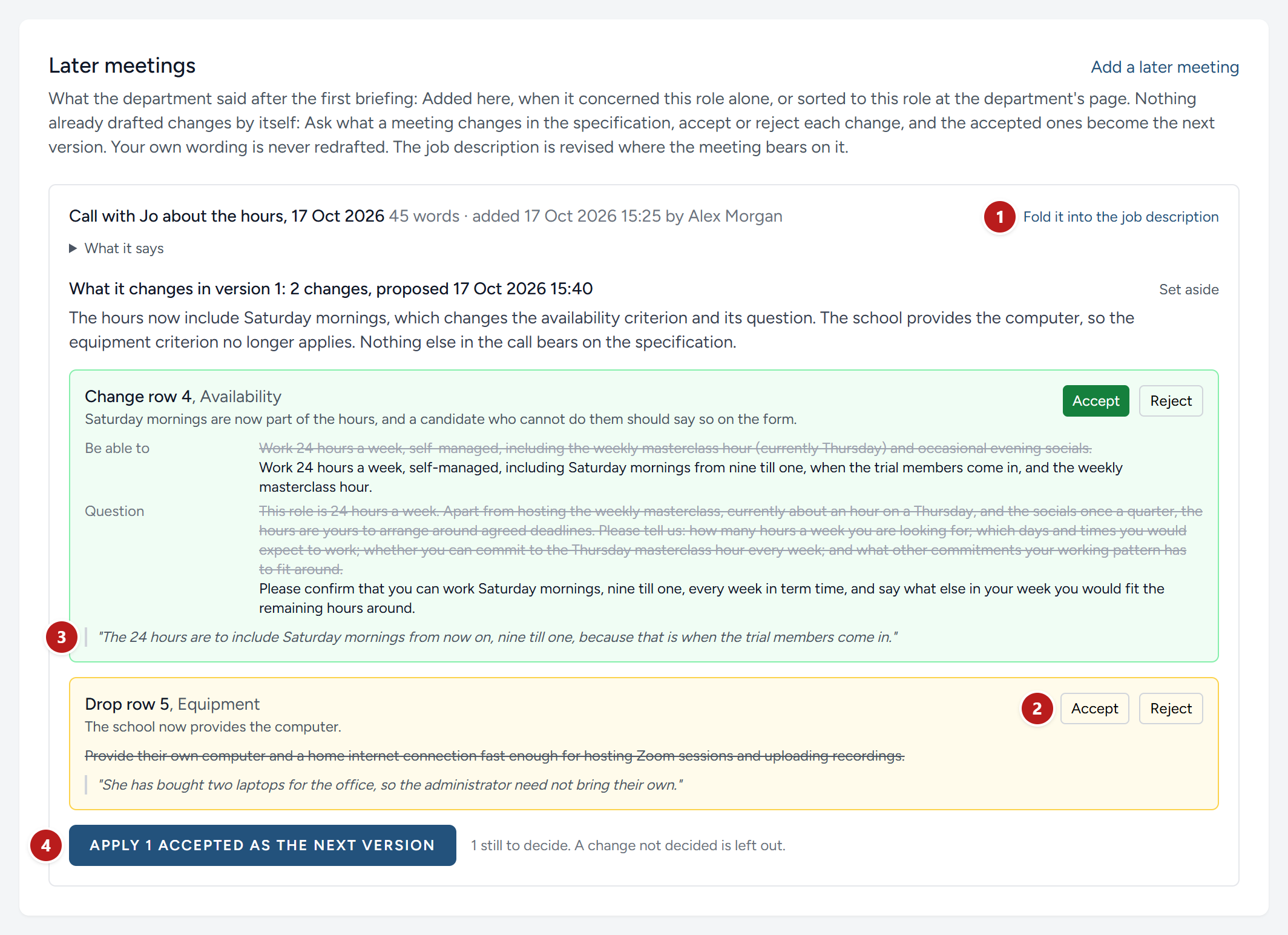
- Fold it into the job description, beside the meeting.
- Accept or Reject, change by change.
- The passage each change rests on.
- Apply the accepted changes as the next version.
Stop 6: The job description
The job description is the advertisement for the role the specification tests, so it is written from the specification, and not the other way round. Alex clicks Draft with Digital Nancy, and she writes a one-page advertisement from the specification and everything the briefing gathered: The bare facts a line at a time, a question the right person answers "yes" to at once, what the role is there to achieve, the responsibilities, About you and About us.
Digital Nancy does not guess at a fact nobody gave. Where the description needs one, she leaves the question in its place, in double square brackets, and lists it. The same questions appear on Jo's page under Questions we have for you, with any of the plain facts still not stated anywhere, and she answers them there. A fact already given, in a document or in the conversation, is not asked again. The answers are folded in, and the description cannot be approved while a gap remains.
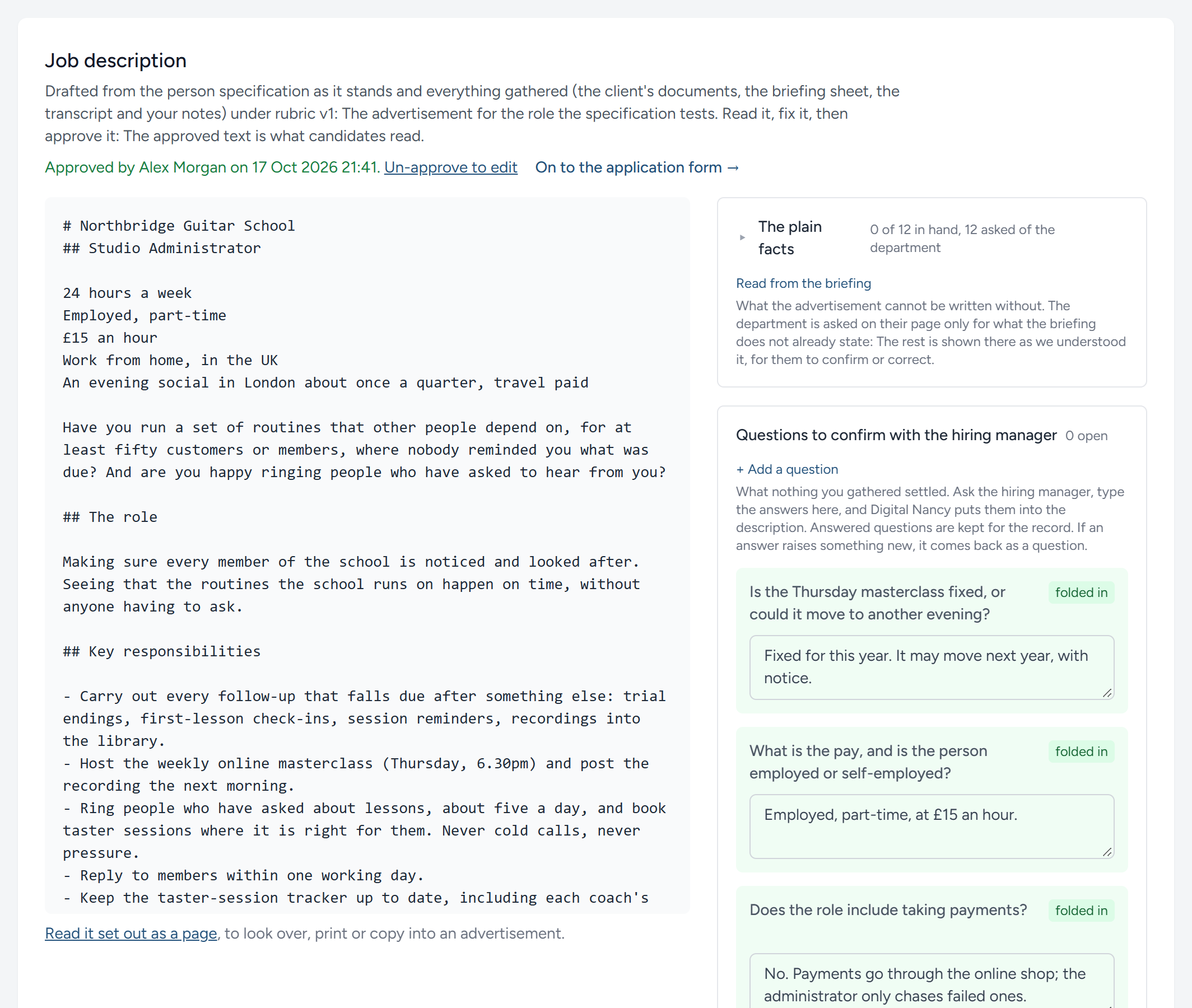
Alex reads it through, changes any wording Jo would not recognise, and approves it. Nothing goes further until a person has said yes. Jo then reads it on her page, under What we agreed. See The job description.
Stop 7: The application form and the advert
One click builds the application form from the published specification: A question for every criterion placed on the form, in the specification's order. A question that asks for a file, such as the CV, gets a box for the file. Alex reads it through as a candidate will see it, and publishes it.
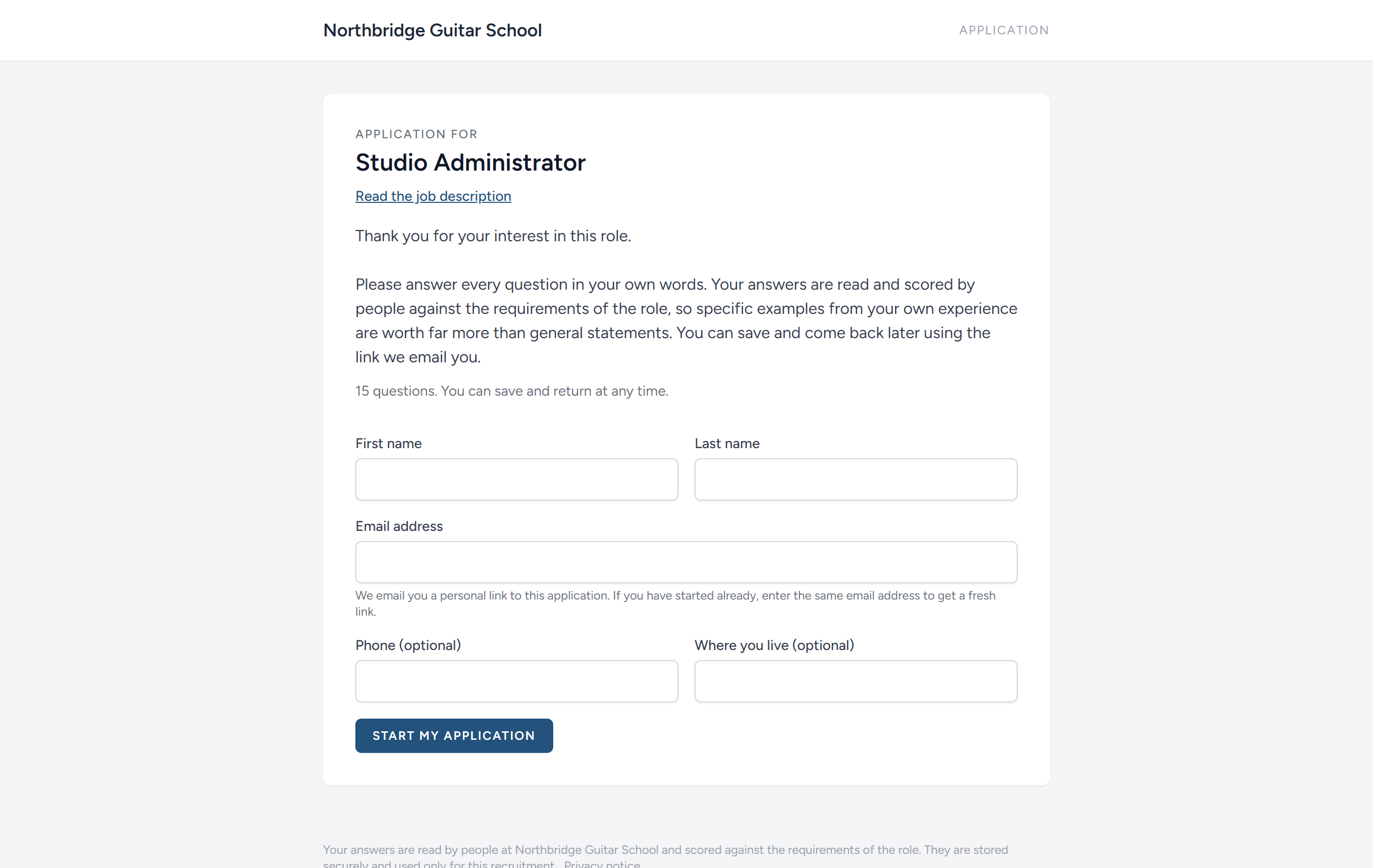
Then the advert: A public page that says what the job is, with a button into the form. Google can list it in its panel of jobs free of charge, and the job boards that collect your feed, Indeed and LinkedIn among them, can list it too. A separate link for each place Alex puts it shows, later, where the applicants came from. See Advertising the job.
Stop 8: Scoring
Once the first person applies, the campaign page turns to the candidates; Campaign setup turns it back to the briefing, the form and the rest. Someone who stops half way through the form is reminded once, and an application left unfinished is archived by itself a few days after that.
On the scoresheet every candidate is a row and every question a column, so you can read one question all the way down and keep your judgement steady. Alex and Sam Reed, who helps with the scoring, read each answer against the criteria the specification set down before anyone applied, and click a band. A pie chart sums up each candidate, and anyone who failed a dealbreaker is flagged, never moved on by itself.
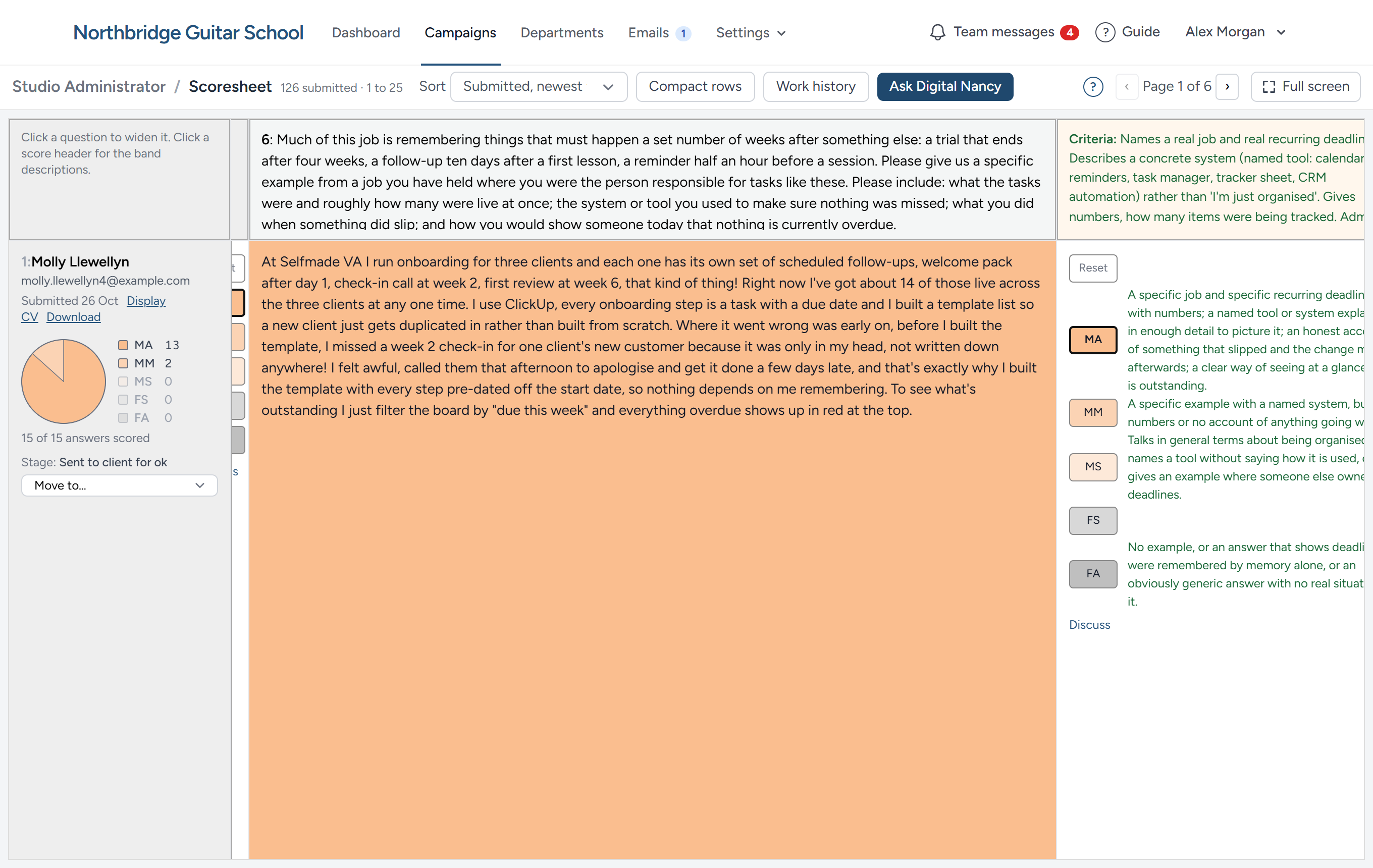
Digital Nancy can read the answers first and propose a band for each, with her reasons. A proposal is only a suggestion: It becomes a band when a person accepts it, and any band can be changed afterwards. Where an answer leaves something out, Alex can put a follow-up question to the candidate, and the reply sits beside the answer. When Sam cannot decide between Met all and Met most, a team message to Alex links straight to that answer. See Scoring the application forms.
Stop 9: Moving people on
Scoring puts each candidate at App Form Scored. From there every move is a decision, made with one click and recorded with who made it: Pass or fail the form, ask a follow-up question, suggest to the client, invite to interview. The pipeline board shows the whole campaign at a glance, one panel to a stage.
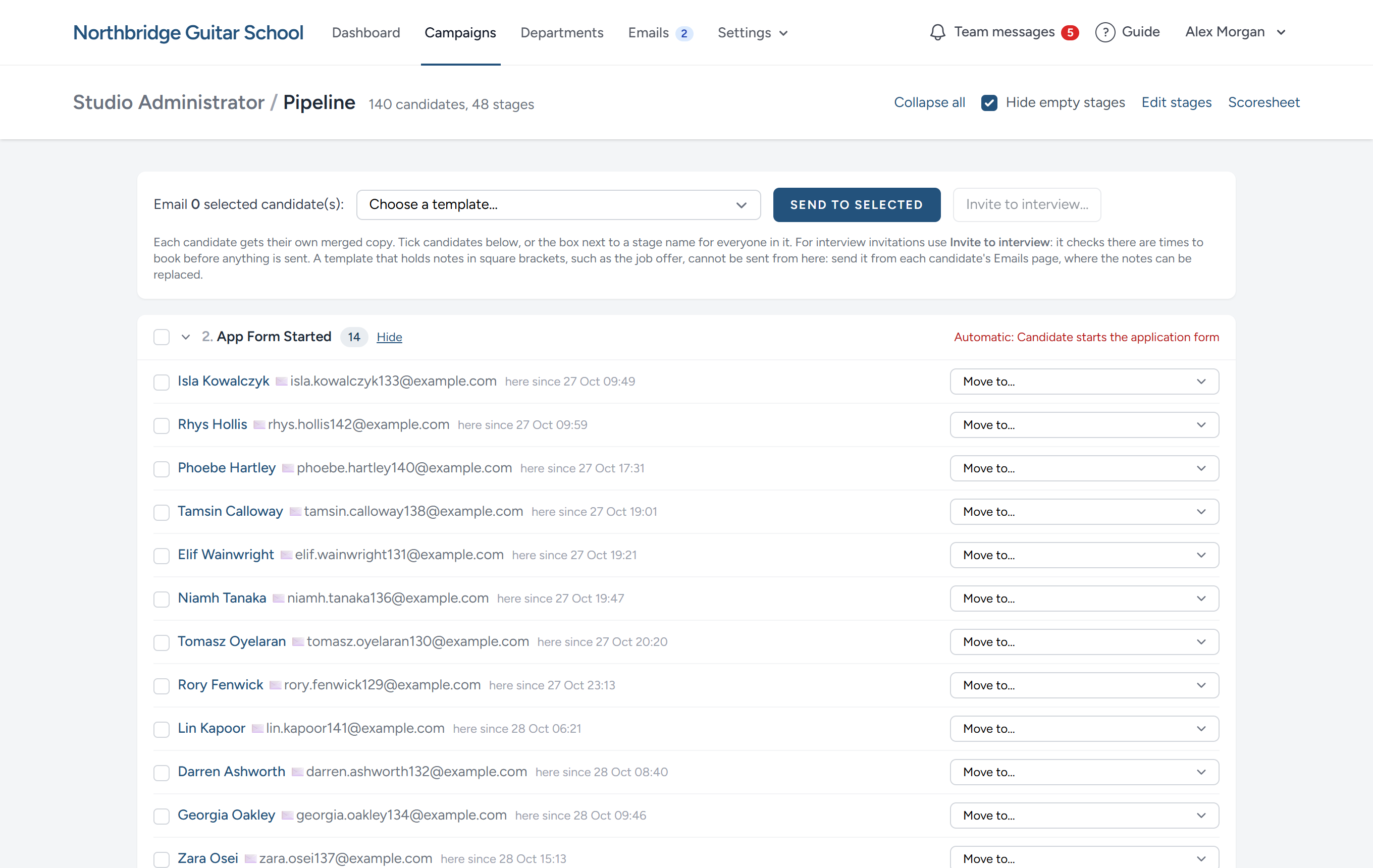
Moving someone can send the email that belongs to that stage, such as the invitation to book an interview. Each campaign sends from an address of its own, so a candidate's reply comes back to the campaign, and every email to and from them is on their Emails page. Candidates who are not going further can be archived with a reason: Nothing is deleted, and they can be brought back. See Managing candidates and the pipeline.
Stop 10: Interviews
The standard pipeline has three: A short interview on the telephone, a long interview online, and a final interview with the client. Alex offers times, and the candidates who pass the form are invited to book their own. They are sent a reminder the day before, and anyone who has not booked is easy to see.
An interview can be recorded as it happens, or the recording or a transcript uploaded afterwards, and it is written out. Digital Nancy writes notes against the criteria kept for that interview. On the scoring page each criterion shows the criteria a good answer meets, then the candidate's own words from the transcript, with Play to hear them, then Digital Nancy's note and the band she suggests. The interviewer reads, listens, and scores. These bands are kept apart from the form's, so you can see whether the person you spoke to matches the person who wrote the form.
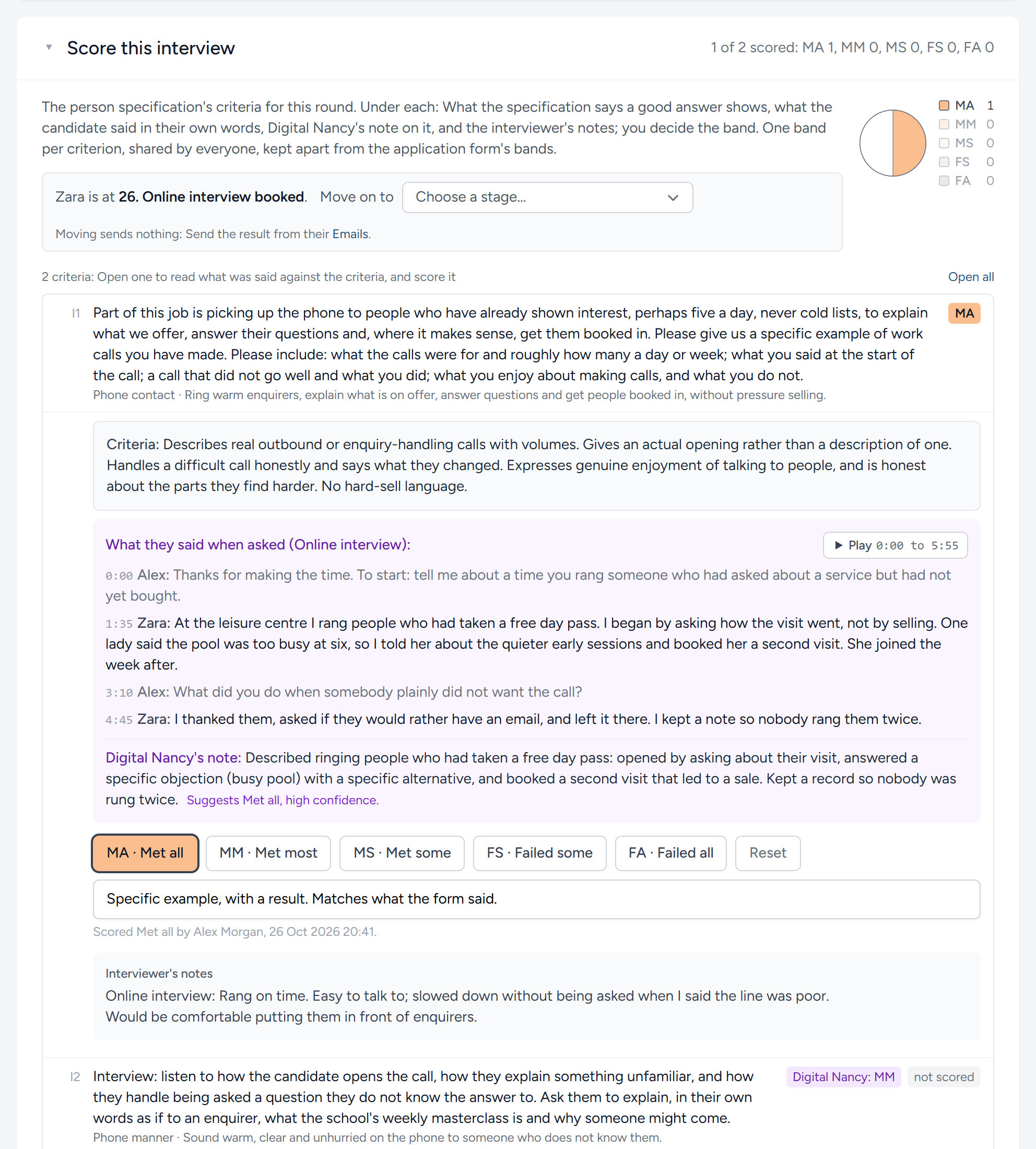
At the short interview, the five things the method notices and never asks, such as voice quality and how quickly the candidate builds rapport, are one click each. Where your organisation reads work patterns, the long interview's transcript is marked for how the person goes about their work, beside what the profile wants, and Digital Nancy can suggest the marks for you to accept. See Interviews.
Stop 11: Suggesting candidates to the client
When the strongest candidates are clear, Alex suggests them to Jo. Alex chooses who is on the list and how much of each Jo may see, such as the answers, the bands and the interview notes, and writes a few lines about each, or has Digital Nancy draft them to correct. Jo signs in, or opens a private link, reads, and clicks Approve, Reject or Unsure beside each name. Her decisions move the candidates along the pipeline by themselves, and Alex is emailed. Discuss, beside each candidate, lets her ask the team before she decides.
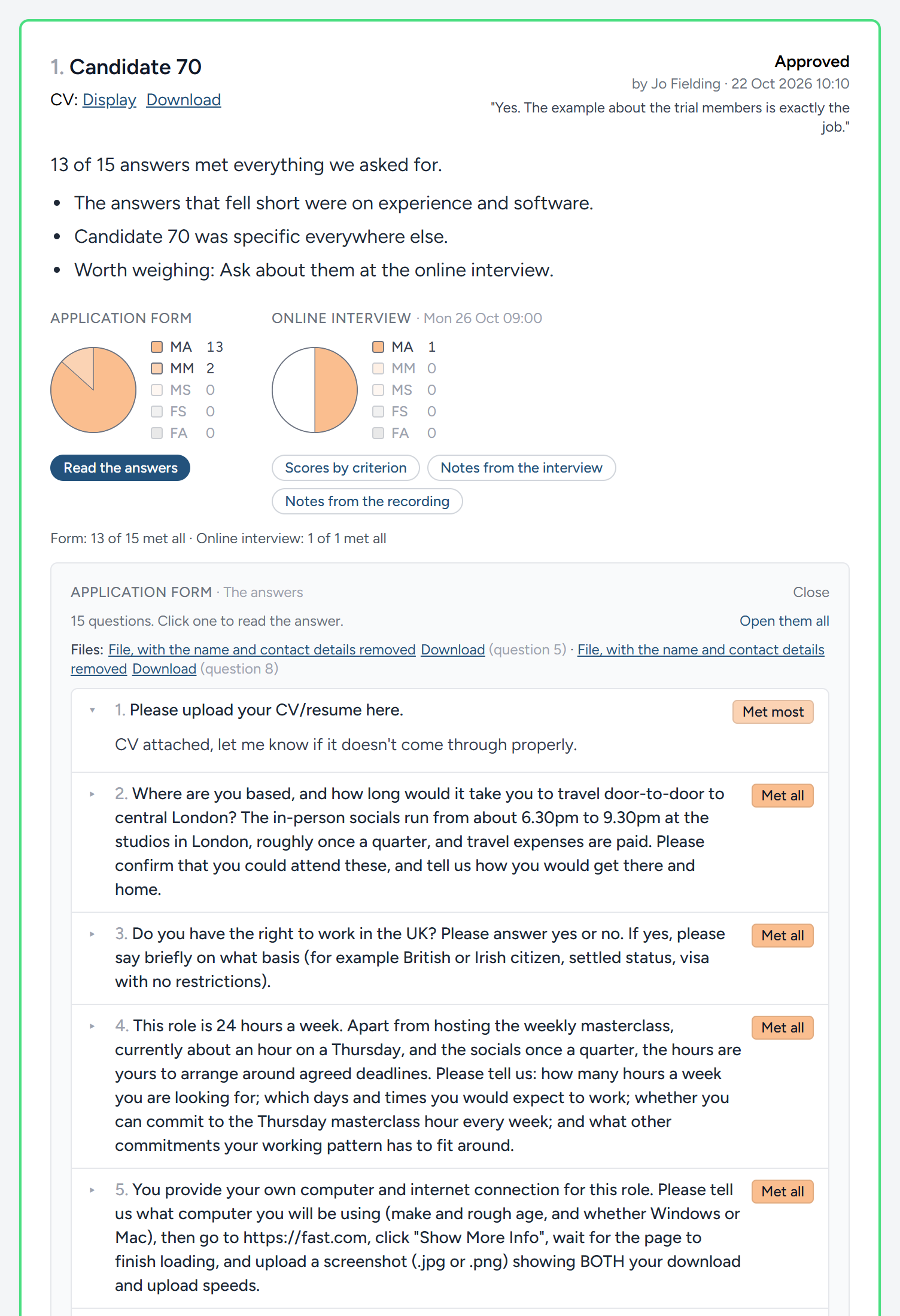
Until Jo approves someone for the final interview, she reads them by number, not by name: The decision rests on what the person did. The standard pipeline suggests candidates more than once, after the form and again after each interview. Jo's own dashboard shows every role being recruited for her, where each has got to and what waits for her decision, and clients have a guide of their own. See Suggesting candidates to your client.
Stop 12: Turning people down, and the offer
Everyone who is not going further is told, kindly, in one email that thanks them and offers feedback to anyone who replies asking for it. When someone asks, one click puts them on Feedback to send, with a letter already prepared from the feedback lines of the criteria they fell short on. It never mentions scores, other candidates, or what the client said. A person reads it, changes what they like, and sends it, signed in their own name. Nothing is sent by itself. See Turning candidates down, and feedback.
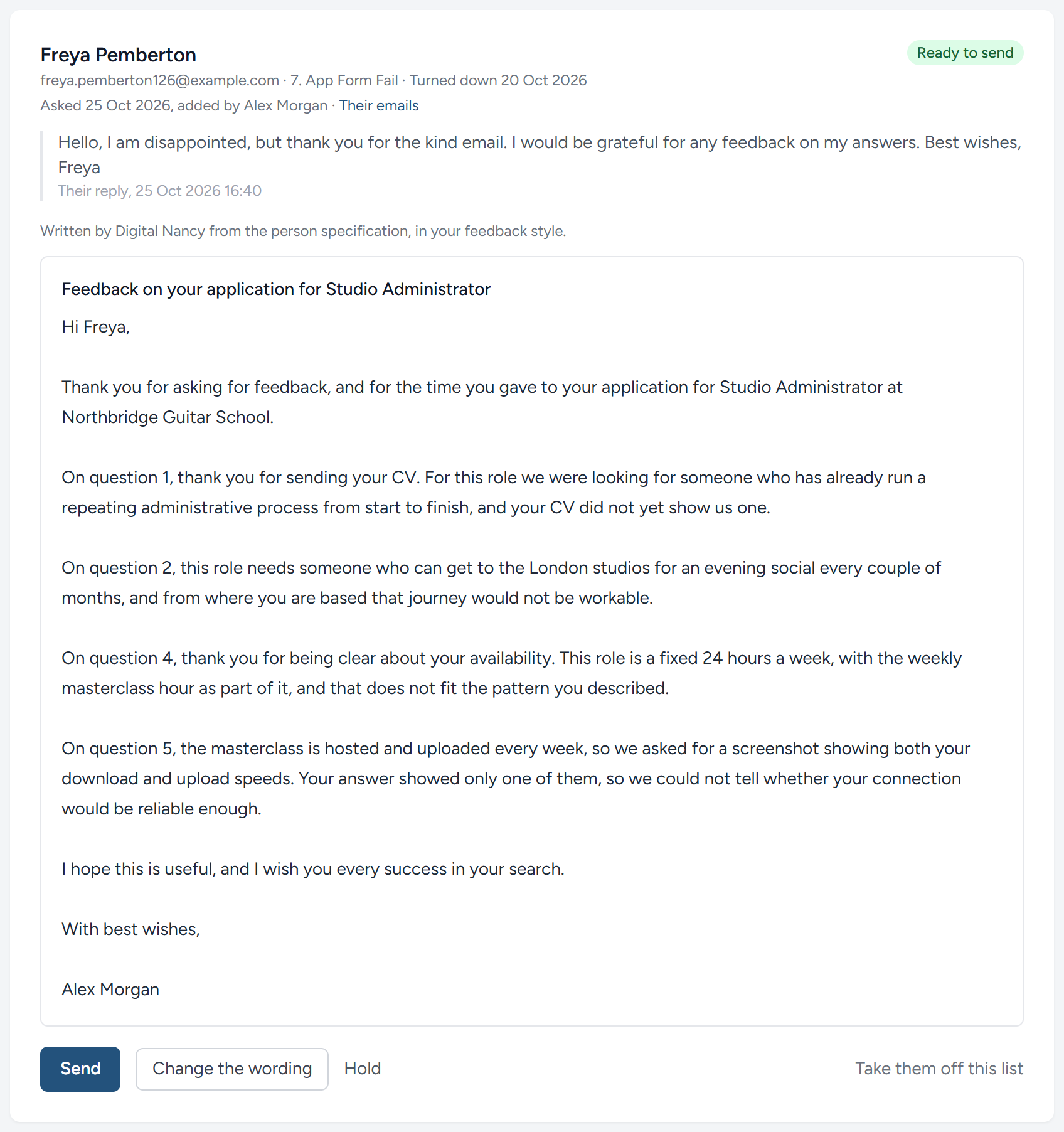
The last stages are the final interview, the offer and the start date. By then every step has been written down: What the client said the job needed, what they agreed, what each candidate said, how it was judged and by whom.
Along the way
- Your dashboard puts what needs doing today at the top, across every campaign: The emails from candidates that nobody has read, and the suggested candidates a client has still to decide on.
- Team messages keep the team's questions beside the thing they are about. A message can link straight to an answer, a question on the form or a criterion of the specification, and a conversation is settled with one line saying what was decided. See Team messages.
- Digital Nancy is included with every campaign, and so is the writing out of your recordings. Every use is recorded under AI runs. See Digital Nancy and your own key.
What you have seen
| The work | Who does it |
|---|---|
| Asking the client the opening questions and the plain facts, and reminding them | HiMatcher, in your name |
| Answering them in writing, each person in their own name | The client |
| Drawing the briefing sheet from their answers | Digital Nancy, checked by you |
| Booking the conversation, from the times you offer | The client |
| Writing out the conversation and every recorded interview | HiMatcher |
| Drafting the person specification from everything the client wrote and said, your notes and any later meeting | Digital Nancy, checked by you |
| Agreeing the specification, row by row | The client, before you publish it |
| Proposing where each criterion is tested, and what a later meeting changes | Digital Nancy, decided by you |
| Drafting the job description, and asking the client what it still needs | Digital Nancy, approved by you |
| Building the form, publishing the advert, sending emails, offering interview times, keeping the record | HiMatcher |
| Suggesting questions on the call, proposing bands, writing interview notes, summaries and feedback letters | Digital Nancy, when you ask |
| Deciding on the candidates you suggest | The client |
| Deciding every band, every move, every letter sent and every hire | You |
Now try it with your own vacancy, or read on: The next part of this guide takes each stop in turn.
This chapter was last revised on 30 October 2026.