Setting up · Chapter 19
Digital Nancy and your own key
What Digital Nancy does and what she never does, what is included with every campaign, when to connect a key of your own and how, what her work costs, and how to read the record of every use.
In this chapter you will
- know the six jobs Digital Nancy does, and the rule that governs all of them
- read the method Digital Nancy drafts under, and give her the facts about your organisation in your house notes
- know what is included with every campaign, and what the cap on it is for
- decide whether your organisation needs a key of its own, and what that changes
- get a key from Anthropic safely, with a ceiling on what it can spend
- connect the key, replace it and remove it
- estimate what a campaign will cost
- read the record of every use, on AI runs, and find out why a request failed
- answer a candidate who asks how AI was used on their application
What Digital Nancy does
HiMatcher has state-of-the-art AI built in, and it is called Digital Nancy: It drafts, proposes and summarises under Nancy Slessenger's method, and is named for her. She does six jobs, and each is described in the chapter where you meet it.
| Digital Nancy | Where | You |
|---|---|---|
| Drafts the briefing sheet from the client's written answers | The briefing: Before the conversation | Check every row, and ask her questions at the meeting |
| Drafts a job description from the briefing | The job description | Answer her questions, correct the draft and approve it |
| Drafts the person specification: Each criterion's question, what a good answer meets and the bands | The person specification | Check every criterion, and publish |
| Proposes a band for an answer on the application form, with her reasons | Scoring the application forms | Accept the proposal, or give a different band |
| Writes notes from a recorded interview, criterion by criterion | Interviews | Check them against the recording, and band what you heard |
| Drafts a summary of a candidate for a client | Suggesting candidates to your client | Edit it before the client reads it |
| Drafts a feedback letter to a candidate whose form fell short, from the specification's feedback | Emails to candidates | Read it, change it, and decide whether to send |
One rule governs all six: Digital Nancy advises, and a person decides. Nothing she writes takes effect until somebody on your team has accepted it. A proposed band is not a band. A draft is not published. She never writes to a candidate, never moves anybody along the pipeline, and never rejects anyone.
She works under the method, as your team does. She reads an answer against the criteria your person specification said a good answer would meet, and is told to take no account of a candidate's name, age, sex, nationality or disability, or of anything else that is not in the answer.
The method it works under, and your house notes
Digital Nancy does not draft from a blank page, or from her own idea of good hiring. Every job description and person specification is drafted under a written method: How to take a briefing apart, what makes a criterion, how a question should be asked, what evidence looks like, and how the bands are described. It is the method this guide teaches, and it is the same for every organisation.
Open Settings in the bar at the top and click House notes. Only admins and hiring managers see it.
The top of the page says what your hiring runs on, and the rest of it is yours. You cannot change the method: It is kept up to date by its author, and each version is numbered. Every draft Digital Nancy makes records which version it was made under, so you can always tell what rules a document was written by.
An organisation that works on the method with its author sees more: The entry is Rubric, the top of the page is the method itself, Read the method opens it in full, the voice it is written in sits beneath, and anything agreed for that organisation alone is shown as Additions agreed for your organisation. That is switched on by HiMatcher, not from the page. Where your organisation helps to teach the method, passages proposed for it from elsewhere, such as a conversation with its author, wait at the top of the page for those who approve the method (see Who approves changes to the method).
Your house notes
The part of the page that is yours is Your house notes. These are facts about your organisation that a briefing rarely covers, because the hiring manager takes them for granted. Digital Nancy reads them every time she drafts a job description or a person specification for you.
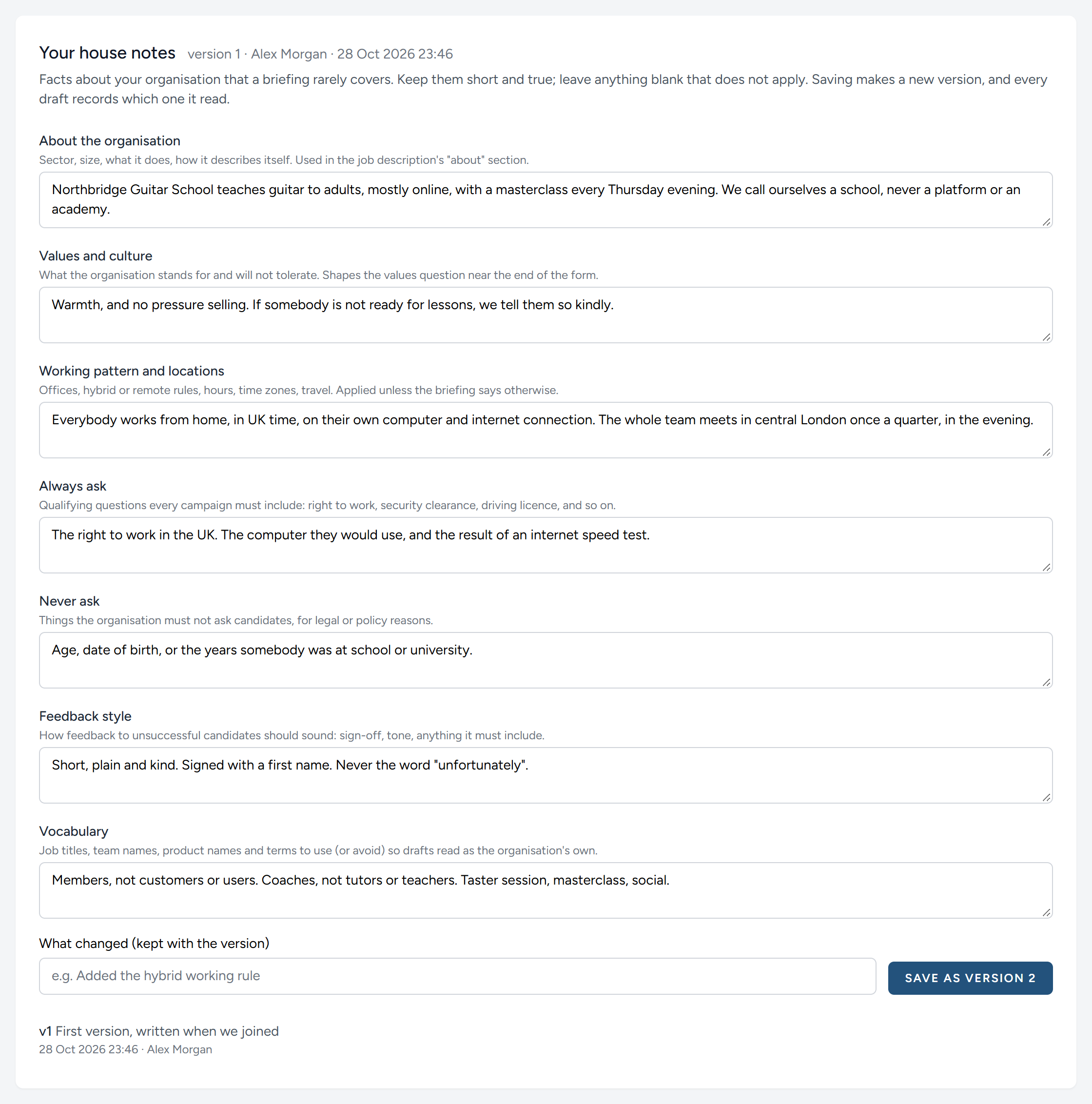
| Note | What to put in it |
|---|---|
| About the organisation | What you do, how big you are, and how you describe yourselves. It feeds the opening of every job description |
| Values and culture | What you stand for and what you will not put up with. It shapes the question about values near the end of each form |
| Working pattern and locations | Offices, home working, hours and travel. It applies unless a briefing says otherwise |
| Always ask | Qualifying questions every campaign of yours must include, such as the right to work or a driving licence |
| Never ask | Anything you must not ask a candidate, by law or by your own policy |
| Feedback style | How a message to an unsuccessful candidate should sound |
| Vocabulary | The words you use and the ones you avoid, so that a draft reads as yours. Northbridge has members and coaches, never customers and tutors |
Keep each one short and true, and leave blank whatever does not apply. To save, say in a few words what changed, and click Save as version 2, or whatever the next number is. Earlier versions are listed at the foot of the page, with who saved each and when.
House notes inform the method and never overrule it. A note that says "always ask for a degree" will get you a question about a degree. It will not persuade Digital Nancy to write "must be organised" as a criterion.
Whose account it runs on
Digital Nancy runs on Anthropic's AI, and everything she does is paid for by whoever holds the key she runs on. A key is a long password that lets HiMatcher use an Anthropic account.
Her work is included with every campaign. From the day your organisation signs up, she runs on HiMatcher's own key, and the writing out of your recordings runs on HiMatcher's own transcription account. There is nothing to set up and nothing to pay beyond the campaign. Each campaign has an allowance on those accounts, $100 unless we have agreed another figure with you, and that is far more than a campaign needs: A heavy campaign, with 150 applicants read and ten recorded interviews written out and marked, comes to about $40. The allowance is there to catch a runaway, such as a request made over and over, and nothing else.
There are three states, and the AI tab under Settings, Config tells you which you are in.
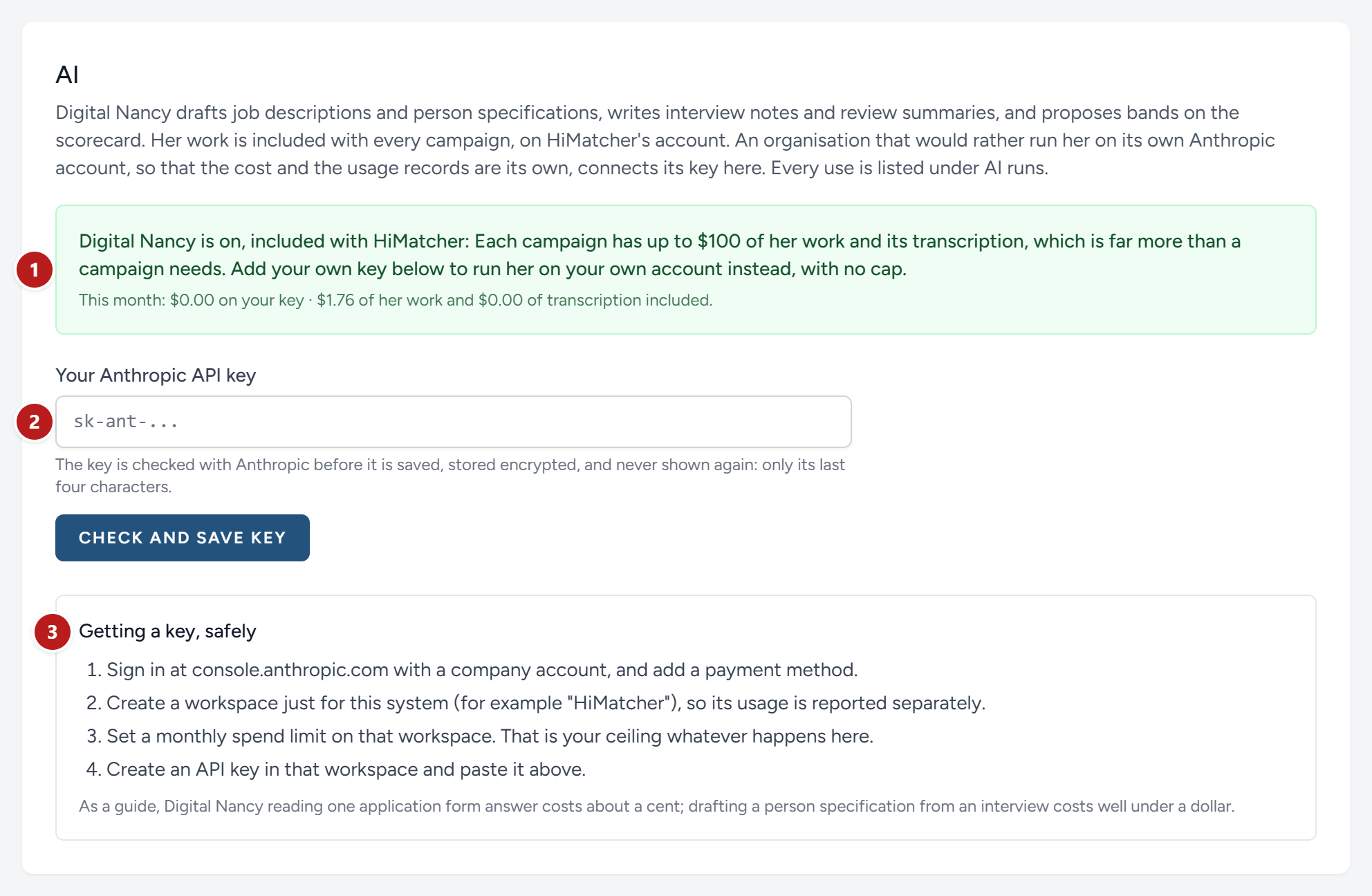
- Where you stand, and what Digital Nancy and the transcription have cost this month.
- The box for your own key.
- How to get one, in four steps.
| The panel says | What it means |
|---|---|
| Digital Nancy is on, included with HiMatcher | She runs on HiMatcher's key, within each campaign's allowance. The record of every use is on AI runs |
| Digital Nancy is on, using your own key | She runs on your organisation's Anthropic account, with no allowance. Anthropic bills you directly, and the record of use in their console is yours |
| Digital Nancy is switched off | HiMatcher's accounts are not switched on for your organisation and no key of your own is connected. The panel says why, and everything else in HiMatcher works as usual |
With Digital Nancy off, the buttons that ask for her work are still there. Clicking one records the request, sends nothing, and tells you that nothing was drafted.
If a campaign does reach its allowance, Digital Nancy stops for that campaign alone, and so does the writing out of its recordings. Every other campaign carries on. The request is recorded on AI runs as skipped, with the reason. We are told at once, look at what happened, and put it right. A recording that was waiting is kept, and is written out when the campaign can go on.
Only admins and hiring managers see the AI tab.
When to connect a key of your own
Most organisations never need to. Connect your own key when your organisation must hold the contract with Anthropic itself, so that candidates' answers are handled under your agreement rather than ours; when you want the record of use in your own Anthropic console; or when a campaign is so large that it needs more than the allowance and you would rather pay Anthropic directly than ask us. With a key of your own, Digital Nancy runs on it for everything, with no allowance, and the included transcription carries on as before unless you choose a service of your own under Settings, Transcription.
Reading websites on your own key
One step reads a website: The employer profile, under Clients or Settings. On the platform's key it needs nothing from you. On a key of your own, Anthropic must have web fetching switched on for your account, which an administrator does in the Anthropic console; until then that one step reports that it could not read the site, and everything else runs as before.
Getting a key, safely
You need an account with Anthropic, in your organisation's name, with a way of paying.
- Sign in at console.anthropic.com with a company account, not a personal one, and add a payment method.
- Create a workspace just for HiMatcher. Its use is then reported separately from anything else your organisation does with Anthropic.
- Set a monthly spend limit on that workspace. This is your ceiling. Whatever anybody clicks in HiMatcher, Anthropic will not let that workspace spend more.
- Create an API key in that workspace, and copy it. It begins
sk-ant-. Anthropic shows it once.
Connecting the key
- Under Settings, Config, AI, paste the key into Your Anthropic API key.
- Click Check and save key.
HiMatcher asks Anthropic whether the key is good before keeping it. If it is, a green message says that Digital Nancy now works on your organisation's own account. If not, the message under the box says why.
| It says | What to do |
|---|---|
| That does not look like an Anthropic key | Part of it is missing, or a space crept in. Copy it again, whole |
| Anthropic did not accept this key | It has been revoked, or belongs to a workspace that has been closed. Create a new one |
| The key could not be checked just now | Anthropic could not be reached. Try again in a few minutes. Nothing has been saved |
The key is stored encrypted, and is never shown again. From then on the tab shows its last four characters only, which is enough to tell which key is in use.
To replace a key, paste the new one in the same box and click the button. To take it away, click Remove the key, and Digital Nancy goes back to HiMatcher's own key, within each campaign's allowance.
What it costs
On HiMatcher's key, nothing beyond the campaign: The figures below are what counts towards the campaign's allowance. On a key of your own, you are charged by Anthropic for what is read and what is written, in small units called tokens. A token is about three-quarters of a word. As a guide:
| Job | About |
|---|---|
| Proposing a band for one answer | Half a cent to a cent |
| Reading a whole application form of fifteen answers | Ten to fifteen cents |
| Drafting a job description from a briefing | Under ten cents |
| Drafting a person specification | Well under a dollar |
| Writing notes from a half-hour interview | Under ten cents |
| Writing out a recorded interview, on the included transcription | Ten cents or so |
| Drafting a summary of one candidate for a client | A cent or two |
These are in US dollars, as Anthropic's prices are, and they are a guide and no more. In the Northbridge example, the briefing, one evening's band proposals for fifty answers, the notes from one interview and nine client summaries came to ninety cents. Asking Digital Nancy to read every answer from 150 applicants would come to somewhere between ten and twenty-five dollars.
Long answers cost more than short ones, and a long briefing costs more than a brief one. Before you ask Digital Nancy to read many answers at once, the scoresheet tells you how many there are and roughly what it will cost.
The record of every use
Open Settings in the bar at the top and click AI runs. Only admins and hiring managers see it.
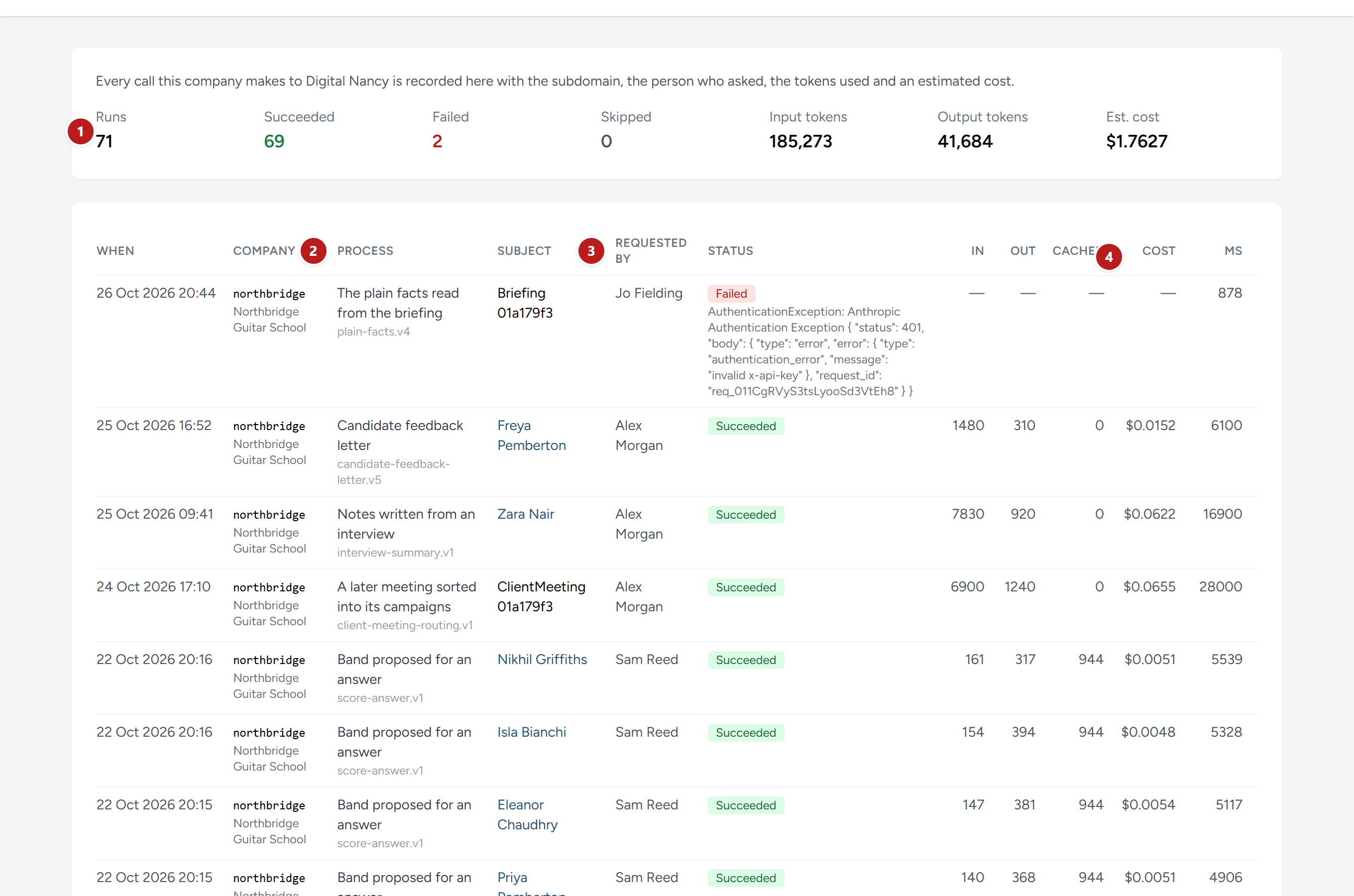
- The totals since your organisation began: How many requests, how many succeeded, failed or were skipped, how much was read and written, and the estimated cost.
- What was asked for, and under it the version of the instructions Digital Nancy was given. When a candidate is involved, Subject names them and opens their scoring page.
- Who asked. Every request is recorded against a named person: Whoever clicked the button, or whoever made the recording that Digital Nancy then wrote notes from.
- What it cost, beside what was read (In), what was written (Out), and what was read at a reduced price because Digital Nancy had seen it moments before (Cached).
The page shows the most recent 200 requests.
| Status | Meaning |
|---|---|
| Queued, Running | Waiting, or in progress. Most requests take a few seconds. A person specification takes a minute or so |
| Succeeded | The draft or proposal is where you asked for it |
| Failed | Nothing was produced. The reason is printed under the status. You are not charged for a request that never reached Anthropic |
| Skipped | Digital Nancy was off when somebody asked, or the campaign had reached its allowance. Nothing was sent, and the reason is printed under the status |
When a request fails
The reason is Anthropic's own message, so it is technical, but a few words in it tell you what to do.
| The reason mentions | What to do |
|---|---|
| A timeout, a rate limit, or being overloaded | Anthropic was busy. Ask again in a minute |
| A credit balance, or billing | Your Anthropic account has run out of credit, or has reached the spend limit you set. Put it right at console.anthropic.com |
| Authentication, or the key | The key has been revoked. Connect a new one |
| Running out of room | The answer was longer than the room it was given, even after HiMatcher asked again with twice the room. We have been told, and put it right; ask again later |
| A request left Queued or Running | HiMatcher marks it as failed when it is still running ten minutes on, or still waiting an hour on. Ask again |
A failure never harms anything. The answer is still unscored, or the box is still empty, exactly as before.
We are told about every one. Whenever a request fails, cannot run or never finishes, in any organisation, the people who run HiMatcher are emailed within the minute with what went wrong, so it is usually being put right before you would think to write to us.
What is sent, and what is not
To do her work, Digital Nancy has to be sent the material. It helps to know exactly what that is.
| For | What is sent to Anthropic |
|---|---|
| A job description or a person specification | The transcript of the briefing, the client's documents, the briefing sheet, the specification or the job description as it stands, the method, and your organisation's house notes |
| A proposed band | The question, the criteria a good answer meets, the description of each band, and the words of the answer. Not the candidate's name, email address, CV or other answers |
| Interview notes | The transcript of the interview, and the criteria it tests. A transcript naturally holds whatever was said, names included |
| A summary for a client | The candidate's name, the role, their answers, the bands your team gave, and any interview notes |
Anthropic processes this in the United States. HiMatcher's privacy notice, which every candidate can read from the application form, names Anthropic and says what is sent, and names AssemblyAI, which writes out recordings on the included transcription in the European Union. On HiMatcher's key, the material is handled under HiMatcher's contract with Anthropic, which forbids its use for training their models and requires it to be deleted after processing. With your own key, it is handled under your organisation's own agreement with Anthropic, so read their commercial terms, and add Anthropic to your own record of the suppliers who handle candidates' data.
When a candidate asks
Candidates are entitled to ask how a decision about them was made. The answer HiMatcher lets you give is a good one.
- Every answer was judged against criteria that were written down before anyone applied.
- A person on your team gave every band. Where Digital Nancy proposed one, a person accepted it or chose differently, and the record shows who and when.
- Digital Nancy was not given their name with their answers, and was told to ignore anything but what they wrote.
- No decision to reject, to interview or to hire was made by software.
If they ask for more, the candidate's scoring page holds Digital Nancy's reasons beside each proposal, and you can read them out.
This chapter was last revised on 30 October 2026.