Choosing the person · Chapter 8
Reading the scoresheet
Where your recruiter lets you, the grid of every candidate against every question, with the band given to each answer; what the five bands mean; and how to ask about one.
In this chapter you will
- open the scoresheet, where your recruiter has let you read it
- read the grid: Candidates down the side, questions across, a band in each cell
- know what the five bands mean, and why there are no marks
- sort the candidates, and open an answer to read it
- ask your recruiter's team about one answer with Discuss
Where it is
The scoresheet is how your recruiter's team reads the application forms: Every candidate against every question, with each answer judged against what a good answer would contain. It is theirs to work on. On a campaign where your recruiter has let you read it, Read the scoresheet appears on the campaign's card on your dashboard and on the campaign's own page. If it is not there, that campaign's scoresheet is not shared with you.
You read the scoresheet and change nothing on it. Nothing you click on it alters a band.
The grid
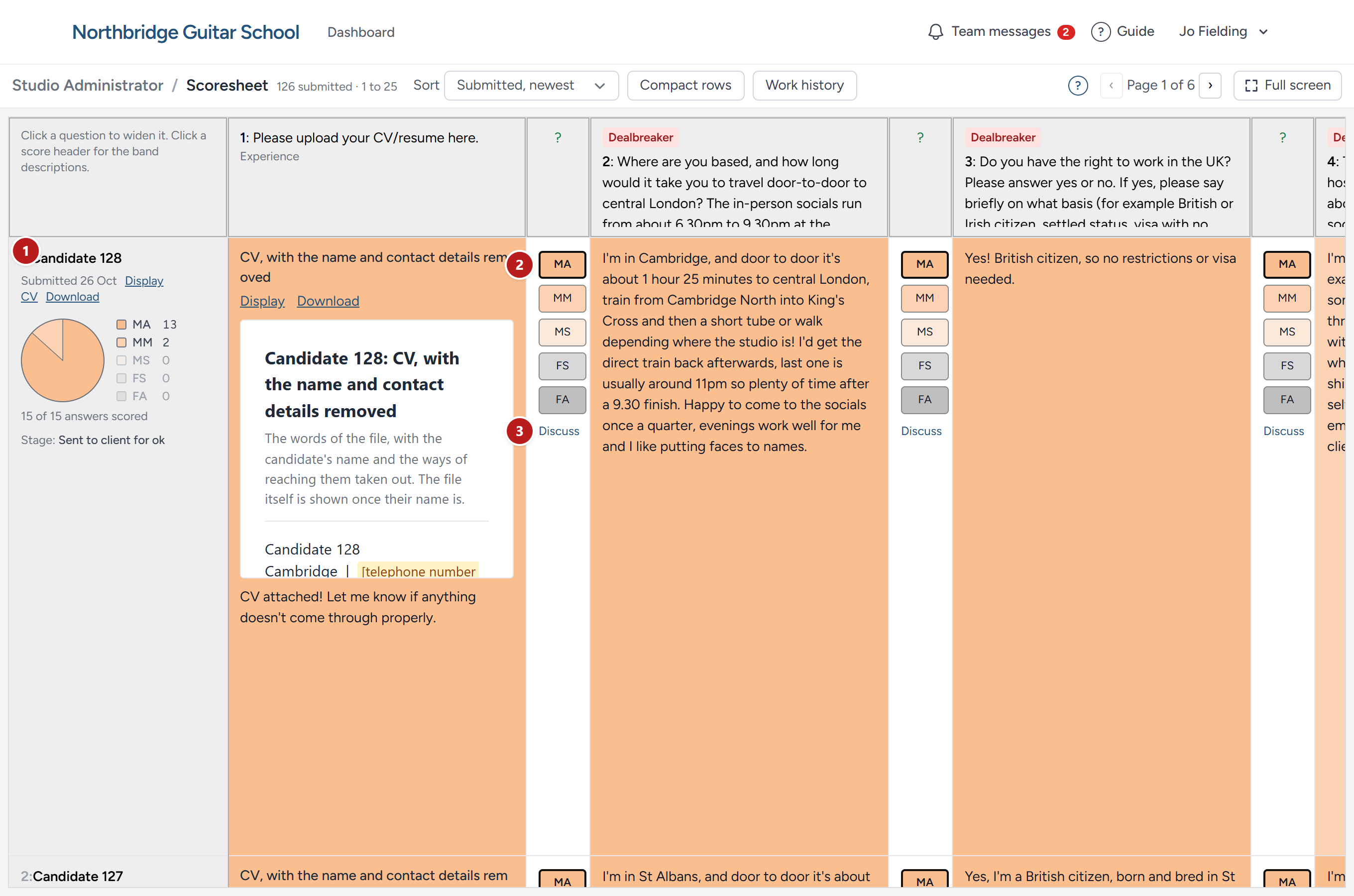
- A candidate, one per row: Their number or name, the day they applied, their CV where your recruiter lets you read it, a pie chart of their bands with the count of each, and how many of their answers have been read. Candidates you have not yet approved for the final interview are numbers here as everywhere (see Why some candidates are numbers).
- The band an answer was given, outlined among the five, beside the answer itself. The answer is in the cell, in the candidate's own words, with any file they uploaded shown as its words; the cell's colour is the band's. A column with no outline is an answer not yet read.
- Discuss, beneath the bands, for asking about that one answer. See Discuss, and your messages.
Across the top, each question heads its column; click a question to widen it, and click a band's heading for what the five bands mean. Sort orders the candidates, Most Met all, then Met most to see the strongest first. Compact rows shortens every row so more fit on the screen, and Full screen gives the grid the whole window. Where a campaign has had more than one version of the form, the bar lets you choose which to read.
The five bands
Every answer is given one of five bands, by comparing it with what the role needs that answer to show. There are no marks and no totals, because adding up marks hides the one thing that matters: Whether the person can do each part of the job.
| Band | Code | What it means |
|---|---|---|
| Met all | MA | The answer showed everything a good answer should |
| Met most | MM | Most of it, with a little missing |
| Met some | MS | Some of it, with more missing than shown |
| Failed some | FS | Little of it |
| Failed all | FA | Nothing of what was wanted |
The colours run from green for Met all to red for Failed all, so a row's colour tells you at a glance how a candidate did across the form. A strong candidate is one with few weak bands on the questions that matter most, and the summary your recruiter writes about each candidate they suggest to you tells you which those are.
This chapter was last revised on 30 October 2026.