Choosing the person · Chapter 7
Deciding on your suggested candidates
Opening the candidates your recruiter has suggested to you, reading about each one, and saying yes, no or unsure; and why some candidates are numbers.
In this chapter you will
- open your suggested candidates from your dashboard, or from the link your recruiter emailed you
- read how each candidate did at each stage, as a pie for the application form and one for each interview
- read a candidate's summary, their answers, the interview notes and their CV, where your recruiter has let you
- approve, reject or mark unsure, with a note, and change your mind while the page is open for decisions
- understand why some candidates are shown as numbers rather than names
- know what happens to a candidate once you have decided
What suggested candidates are
Your recruiter reads every application against what the role needs. When a few people stand out, they suggest them to you: Those candidates, a few lines of their own about each, and as much of each application as they think you should see. These are your suggested candidates. You read about them and say yes or no to each person.
Your recruiter may suggest candidates to you more than once on a campaign: After the application forms, after the first interviews, and before the final interview. Each time they are a page of their own.
Your recruiter may instead, or as well, keep a review list for the campaign, titled For your review: One page they add candidates to one at a time, as each comes through. Your recruiter may email you when there are more, and the campaign's own page says how many are waiting for you under Candidates for your review. You read and decide on it exactly as on any other suggested candidates, and what you decide about one candidate stands while others are added.
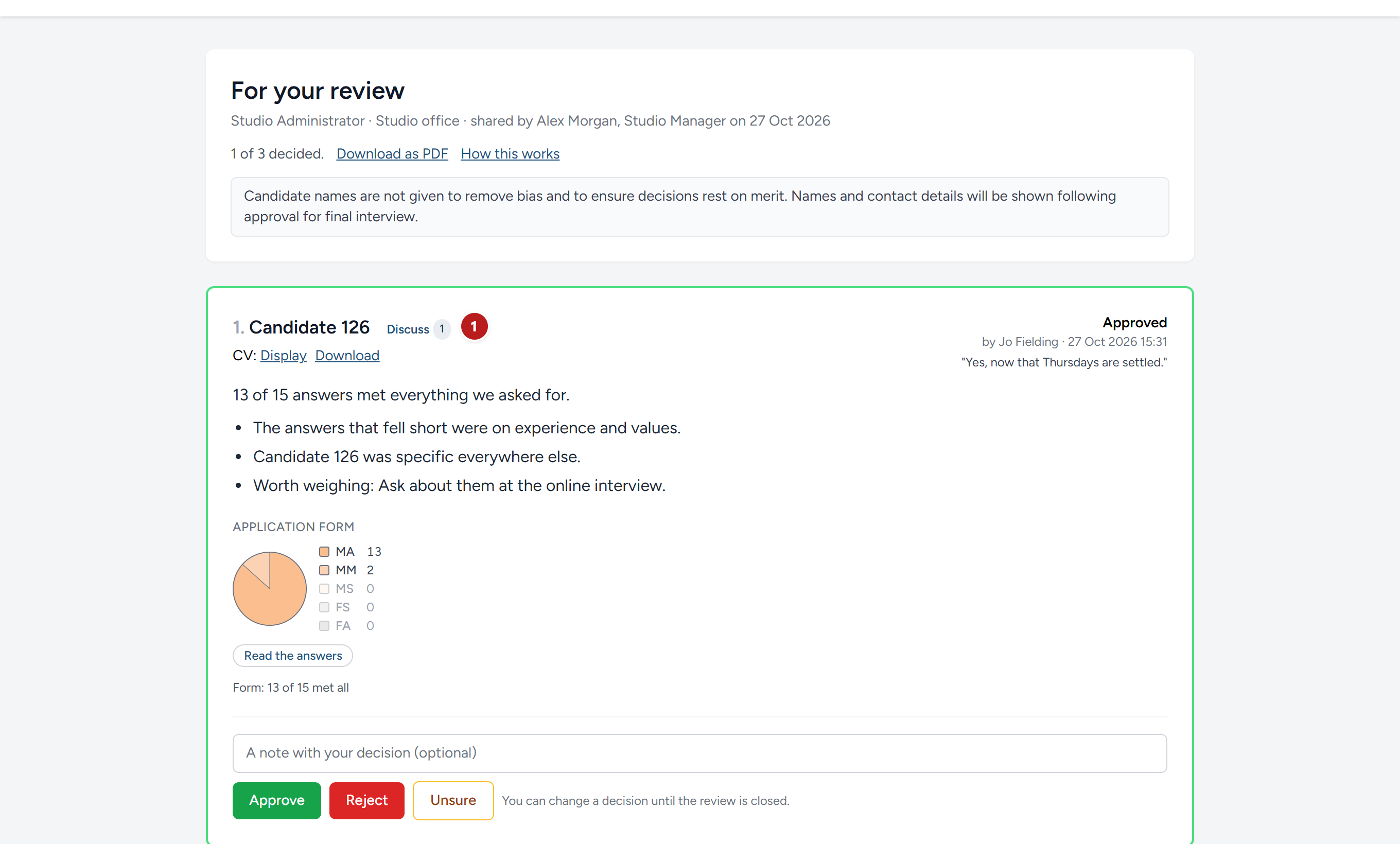
Opening it
There are two ways in, and you may be sent either.
From your dashboard. When suggested candidates are waiting for you, the campaign's card says so and has a button, Decide on your suggested candidates, or Decide on your review list where it is the list. Once you have decided on them all, it reads Open your suggested candidates, and once your recruiter has closed them to decisions, Read your suggested candidates. The campaign's own page has the list under Candidates for your review, and all your suggested candidates under Candidates scoresheet, with how far each has got.

By link. Your recruiter may instead email you a link, headed Suggested candidates for your decision, with a button, Open your suggested candidates. It opens them on their own, without signing in. Anyone with the link can open it, so keep it to yourself and do not forward it. The link works for thirty days, or until your recruiter withdraws it. Before your first decision, the page asks for your name, which is recorded with everything you decide.
Reading your suggested candidates
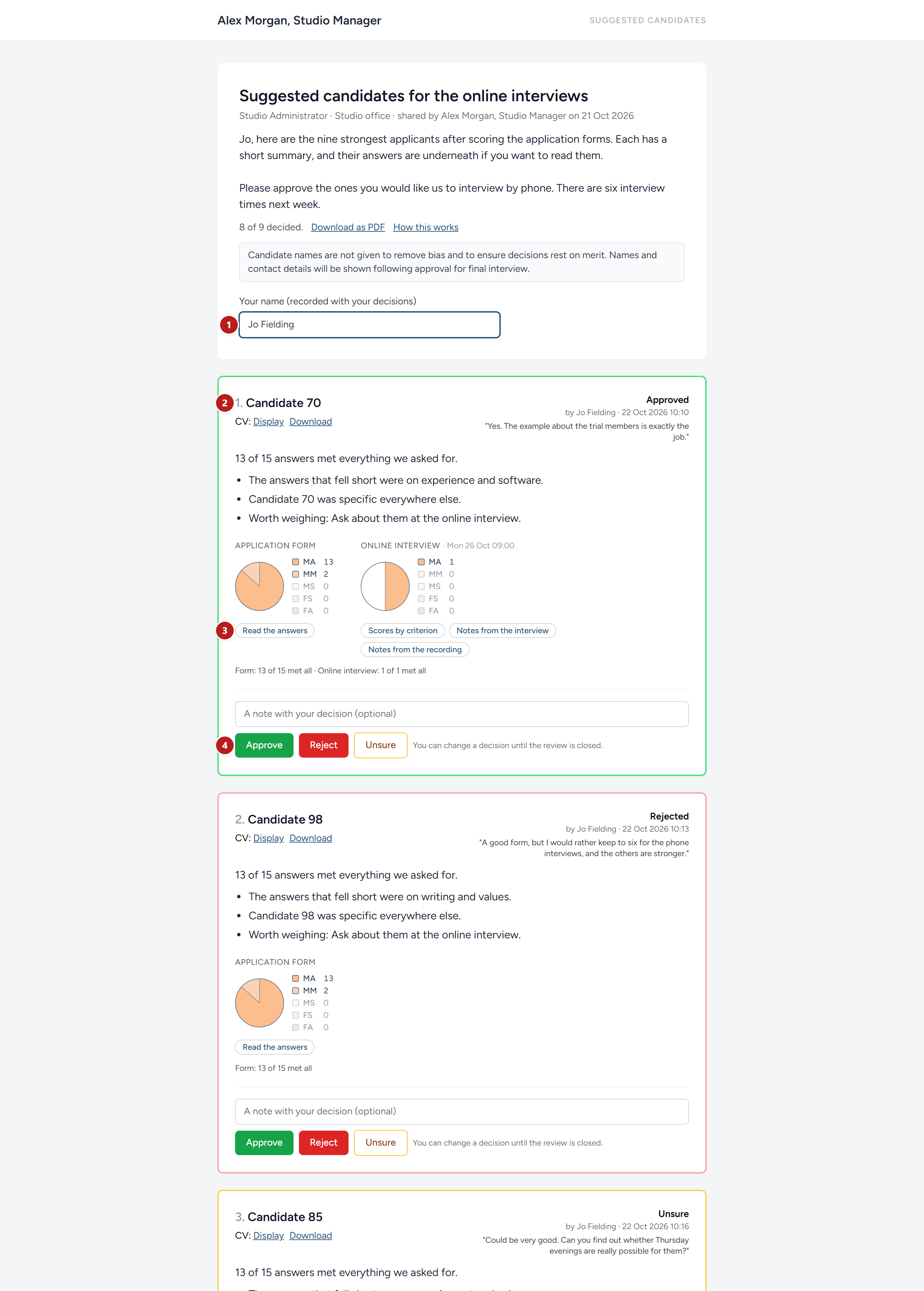
- Your name, if you came by link, typed once before your first decision.
- A candidate: Their number or name, CV with Display and Download if your recruiter is letting you read it, and then the summary they wrote about this person for you: A line on what they bring, then a few points, with anything worth weighing last.
- How they did, stage by stage. A pie for the application form, and beside it a pie for each interview that has been held and scored: The short interview, the online interview, the final interview, as the campaign has them. Each pie is the bands that stage's answers were given, best first, with the counts beside it. Under the pies, one line sums it up: Form: 13 of 14 met all · Online interview: 1 of 2 met all. The links under each pie open the detail for that stage, in place.
- Approve, Reject and Unsure, with room for a note.
At the top of the page is the title your recruiter gave it, their message to you, and a count, 8 of 9 decided, that tells you how far you have got. Download as PDF gives you every one of them as a document to read offline or pass round, with the same pies.
Reading the detail
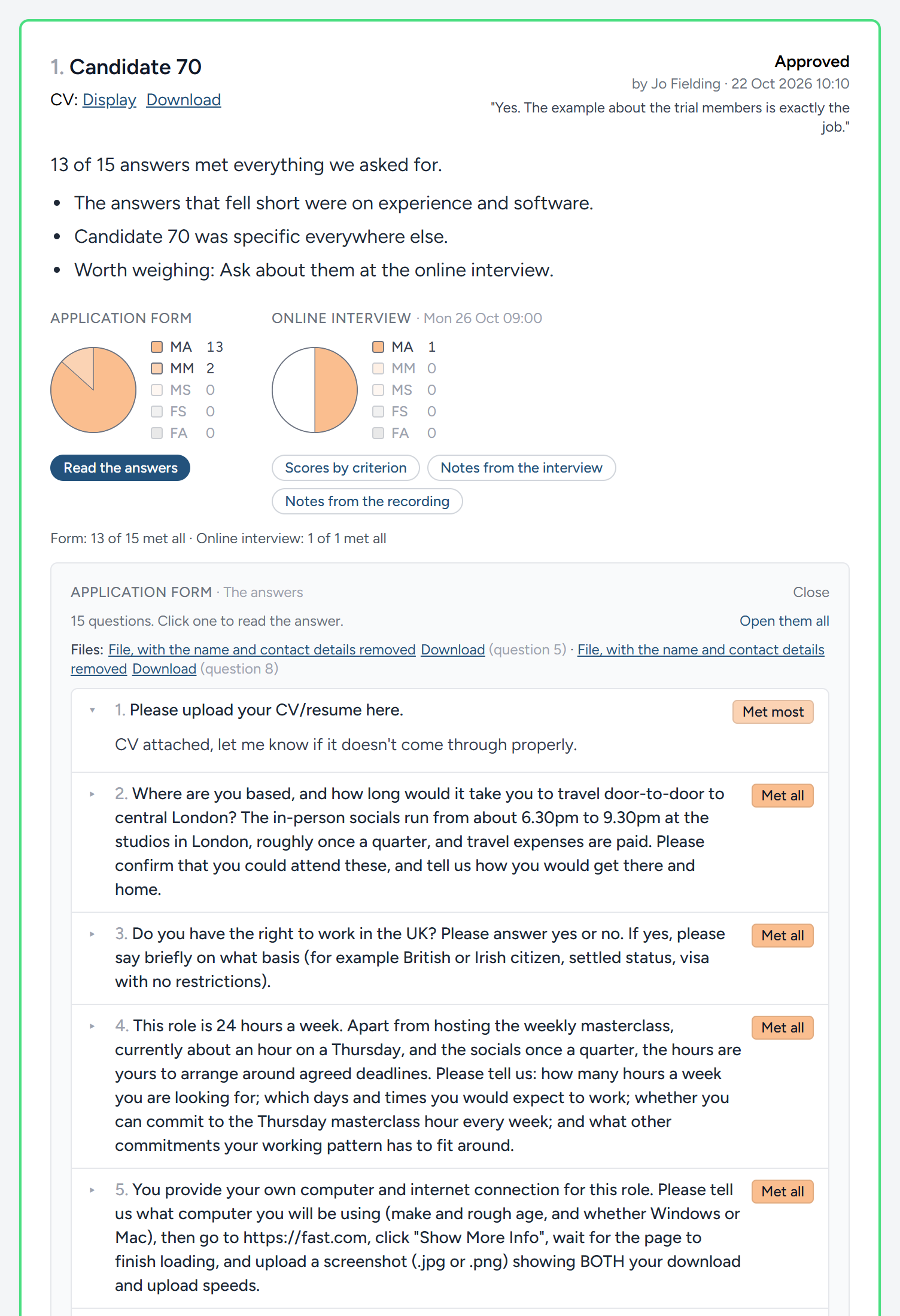
Under the form's pie, Read the answers opens every question on the application form, one line each, with the band the candidate's answer was given as a tag on the right. Click a question to read the answer; click it again to fold it. Open them all unfolds the lot, for reading straight through. A long answer shows its first few lines, with Show more to read the rest. Any files the candidate sent are listed in a row at the top, with the question each belongs to, so you can open a spreadsheet or a certificate without hunting for it.
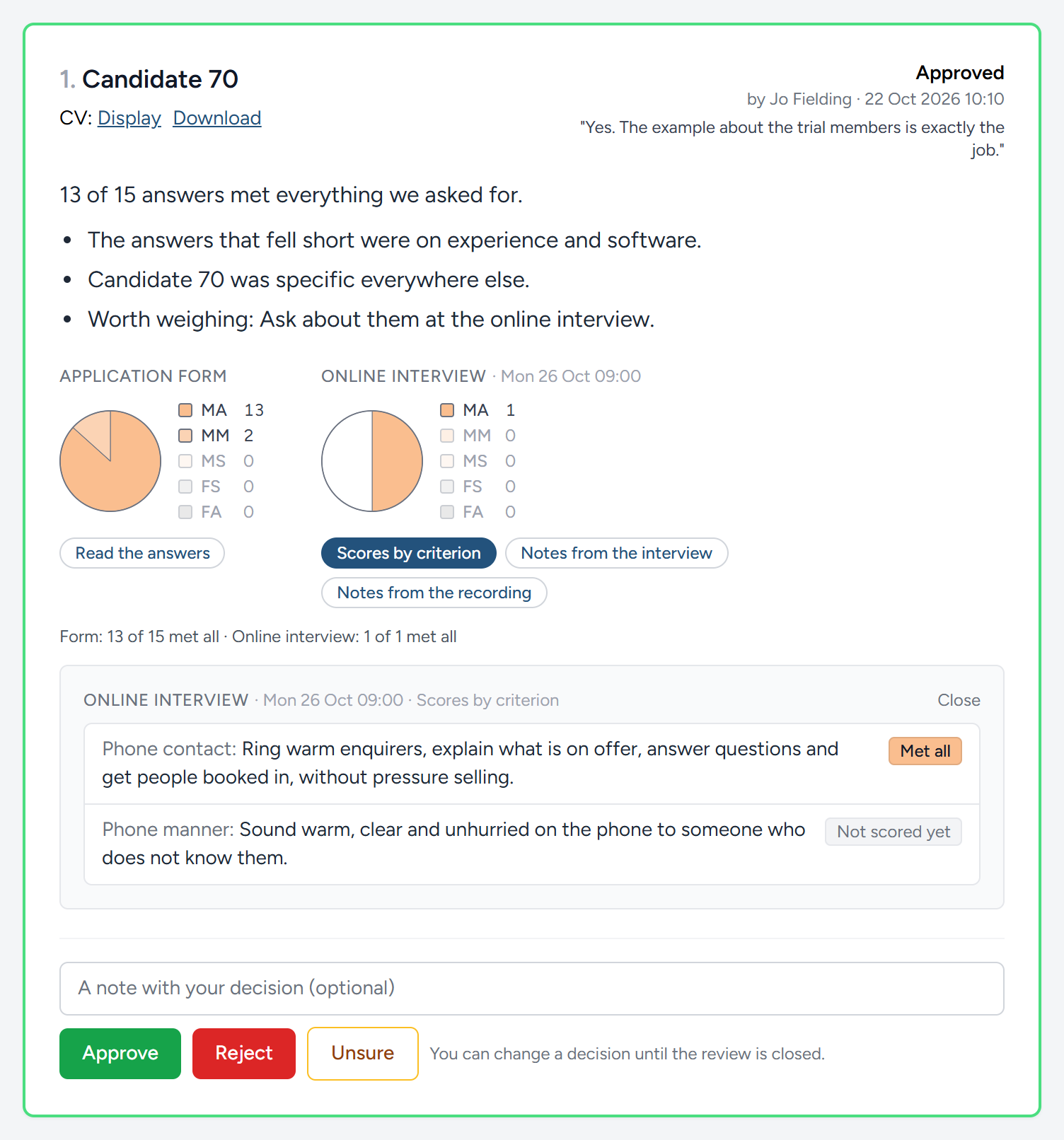
Under an interview's pie there are up to three buttons, depending on what your recruiter has let you see, and one opens at a time beneath, with Close at its corner. Scores by criterion lists what that interview was there to test, with the band your recruiter gave for each as a tag in that band's colour; one not yet scored says so in grey. Notes from the interview is what the person who held it wrote down, with the bands they gave listed beneath. Notes from the recording, where the interview was recorded, is what Digital Nancy, the artificial intelligence built into HiMatcher, drew from the transcript against the same criteria: Her short overview, then a line of counts in the band colours saying how the criteria were scored, then one fold per criterion, headed by the criterion with its band as a tag, and what the candidate said folded away until you click it, with Open them all to read straight through. Anything worth knowing sits apart at the end. The band shown is always the one your recruiter gave, never the one she suggested.
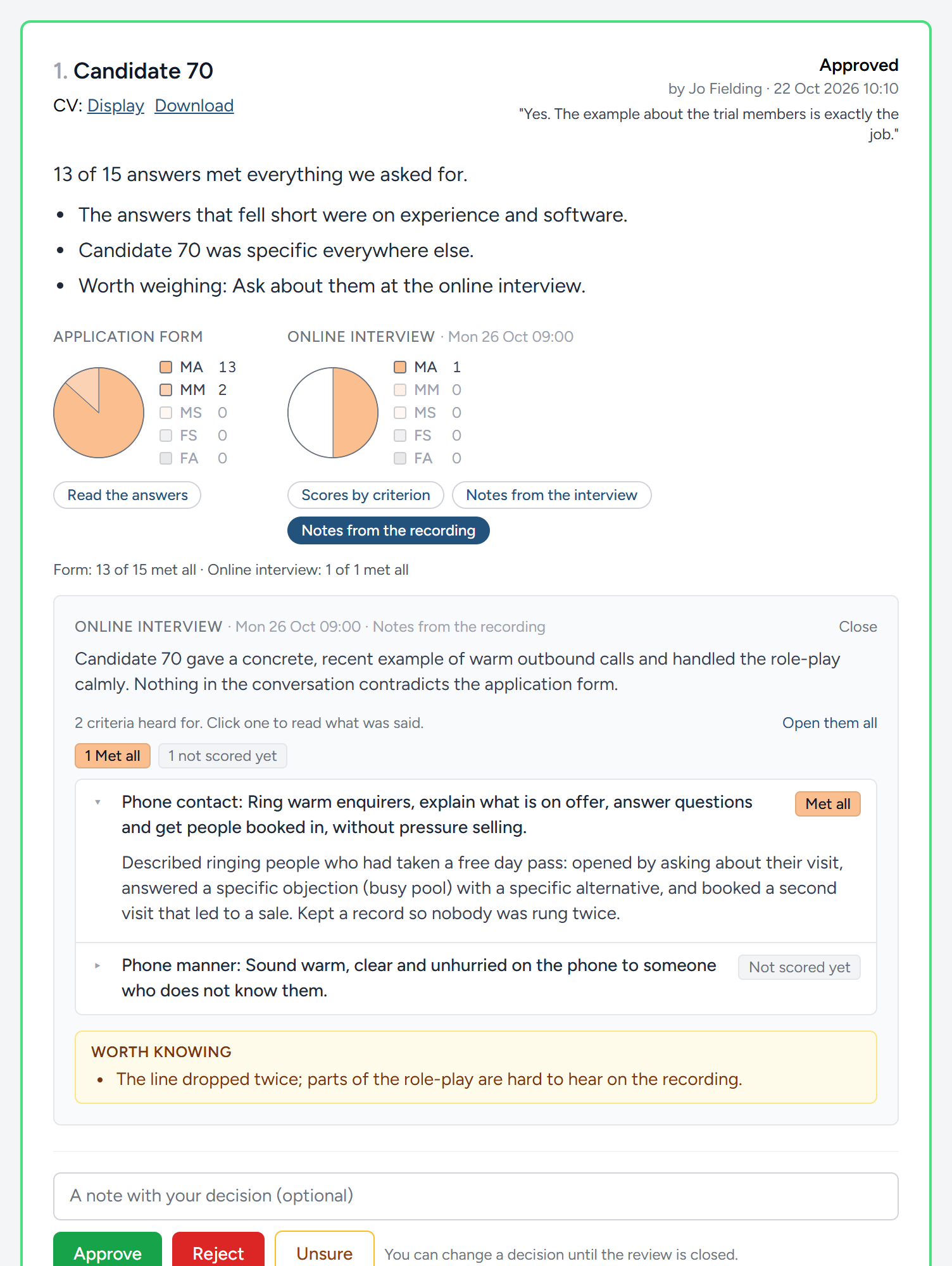
What you can see is chosen by your recruiter each time they suggest candidates, so one page may show the pies and the answers while another shows only summaries. Whatever they choose, you never see a candidate's email address or telephone number, their correspondence with your recruiter, or the notes your recruiter's team keep for themselves.
Deciding
Read the pies first, then the detail where a pie makes you want to look closer, then decide. Beside each candidate, write a note if you have one, and click Approve, Reject or Unsure. The note is for your recruiter; the candidate never sees it. The candidate's border turns green, red or amber, and your decision is printed at the top right with your name and the time.
You can change any decision for as long as the page is open for decisions. Click a different button and the new decision replaces the old one.
When your recruiter closes it to decisions, it stays on your dashboard to read, under the campaign, and says so at the top. Decisions can no longer be made or changed on it.
What your decision does
Your decision moves the candidate along. Someone you approve goes forward to the next step, an interview or the final interview as the campaign has it. Someone you reject is let go, with your recruiter writing to them. Unsure moves nobody forward, and if you had already approved or rejected the person it puts them back where they were; it tells your recruiter you want to talk about this one. Your recruiter is emailed as your decisions come in.
Why some candidates are numbers
On most campaigns you do not see a candidate's name until you have approved them for the final interview. Until then they are Candidate 7: A number given in the order people applied, and kept, so the same person is Candidate 7 every time they are suggested to you on that campaign. Their name, email address, telephone number, any web address and their postcode are taken out of everything you read about them, their CV and the interview notes included. The page says so at the top where it applies: Candidate names are not given to remove bias and to ensure decisions rest on merit.
This is on purpose. The method rests the decision on what the person can do, and a name tells you nothing about that. Where a campaign always shows names, or your recruiter has shown you one, you see the name instead.
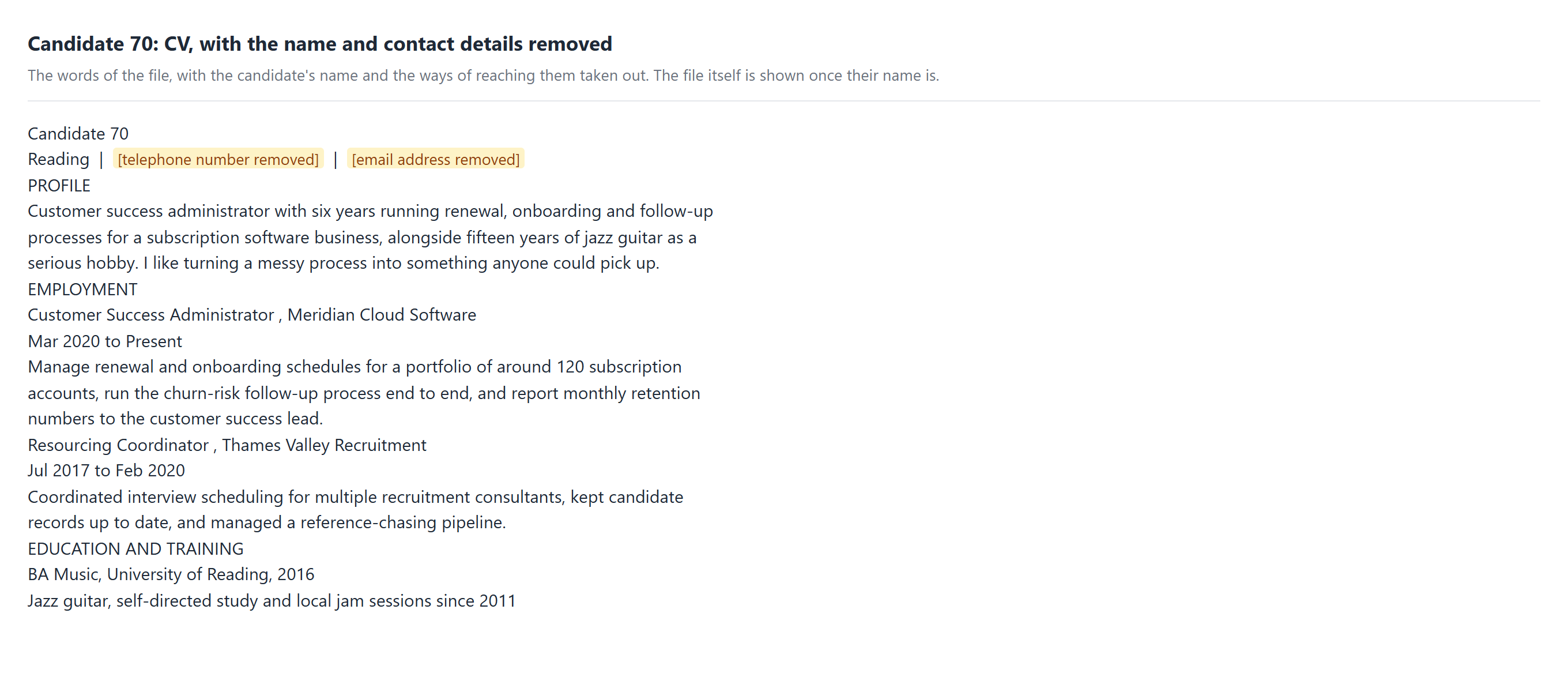
A CV read this way is its words on a page, not the original document, so that nothing is missed in taking the name out. The names of employers and schools stay. Once you see the candidate's name, you see the CV as they sent it.
This chapter was last revised on 30 October 2026.